# Tinylytics > Tinylytics is a privacy-first analytics platform for small websites and personal projects. ## Homepage - [Homepage](https://tinylytics.app/) - [Sign Up](https://tinylytics.app/auth/sign_up) - [Sign In](https://tinylytics.app/auth/sign_in) ## Documentation Hub - [Docs](https://tinylytics.app/docs) ## Documentation (Full Text) ### Understanding Your Analytics Source: https://tinylytics.app/docs/analytics_guide # Understanding Your Analytics Tinylytics provides a clean, privacy-focused dashboard that helps you understand your website traffic without compromising your visitors' data. This guide explains the metrics available to you and how to interpret them. ## Privacy First Unlike traditional analytics tools, Tinylytics does not use cookies, local storage, or fingerprinting to track users across the web. - **No Cookies**: We do not store any files on your visitors' devices. - **GDPR/CCPA Compliance**: Because we don't collect personal data, you generally do not need to display annoying cookie consent banners for our script. - **Data Ownership**: You own your data. You can export it or delete it at any time. ## The Dashboard When you view a site in Tinylytics, you are presented with the **Overview** tab. This is your main analytics hub. ### The Chart The main chart displays traffic trends over time. You can toggle between different time periods (e.g., Last 24 Hours, 7 Days, 30 Days) to see how your traffic is performing. - **Hits**: The total number of times your pages were loaded. - **Unique Hits**: (If enabled) An approximation of unique visitors based on anonymous daily hashes. ### Breakdown Metrics Below the main chart, you will find detailed breakdowns of your traffic: #### Top Pages Shows which specific pages on your site are the most popular. This helps you identify what content resonates most with your audience. #### Referrers Shows where your traffic is coming from. - **Direct**: Visitors who typed your URL directly or clicked a bookmark. - **External Sites**: Links from other websites (e.g., Twitter, Google, other blogs). - **Internal**: Traffic moving between pages on your own site (often hidden by default to keep stats clean). **Why do I only see the domain (e.g. linkedin.com, google.com) and not the full page or search keywords?** Tinylytics records whatever the browser sends in the referrer. That is controlled by the **referring site** and the browser’s **Referrer-Policy**, not by Tinylytics. Many sites (e.g. LinkedIn, Google) use a policy like `strict-origin-when-cross-origin`, so for cross-origin clicks only the *origin* (e.g. `https://www.linkedin.com`) is sent—no path, so you cannot see which specific post or profile. **Google does not include search terms in the referrer**; that has been the case since 2012 for privacy. To see search keywords for your site, use [Google Search Console](https://search.google.com/search-console). For links you control (newsletters, social posts, ads), you can add UTM parameters to your links to identify campaigns and sources. #### Countries A geographic breakdown of your visitors. This is determined using the visitor's IP address, which is discarded immediately after the country lookup is performed. #### Browsers & Platforms Understand the technology your visitors are using: - **Browsers**: Chrome, Safari, Firefox, etc. - **Platforms**: iOS, Android, macOS, Windows, etc. ## Insights The **Insights** tab provides deeper analysis and automated suggestions based on your traffic patterns. Tinylytics analyzes your data to find trends, such as: - Spikes in traffic compared to previous periods. - New top-performing content. - Changes in referrer sources. ## Managing Your Data ### Exporting Data You can download your raw analytics data at any time. 1. Go to your site's dashboard. 2. Click the **Export** button (usually found in the site settings or bottom of the dashboard). 3. Choose **CSV** format to download a file compatible with Excel, Numbers, or Google Sheets. ### Ignoring Traffic You can prevent your own visits (or specific paths) from skewing your data. - **Ignore Paths**: In the **Edit** tab, you can specify URL patterns to ignore (e.g., `/admin`). - **Ignore Your Browser**: You can set a special flag in your browser so Tinylytics ignores your personal visits. See [Ignoring your hits](https://tinylytics.app/docs/ignore_your_hits) for details. ## Public Statistics Want to show off your traffic? You can make your analytics dashboard public. 1. Navigate to the **Edit** tab for your site. 2. Toggle **Public Stats** to "On". 3. You will be given a public URL that you can share with anyone. ### API Documentation Source: https://tinylytics.app/docs/api # Tinylytics API Use the Tinylytics API to read analytics, send hits, events, and kudos from your backend, and automate reporting. ## 1. Quick Start **Base URL** `https://tinylytics.app/api/v1` **Header format** ```bash Authorization: Bearer tly-ro-your-api-key Accept: application/json ``` Use `tly-fa-...` (Full Access) for write endpoints. ### Test your key in 30 seconds ```bash curl "https://tinylytics.app/api/v1/me" \ -H "Authorization: Bearer tly-ro-your-api-key" \ -H "Accept: application/json" ``` If valid, you get your account payload with HTTP `200`. ### Discovery and schema You can bootstrap clients without reading prose docs first: ```bash curl "https://tinylytics.app/api/v1" curl "https://tinylytics.app/api/v1/openapi.json" ``` ## 2. Authentication and Access - Auth scheme: `Bearer` token. - Key location: Account Settings → API Access. - Read-only keys (`tly-ro-...`) can call all `GET` endpoints. - Full-access keys (`tly-fa-...`) are required for: - `POST /sites/:id/hits` - `POST /sites/:id/hits/batch` - `POST /sites/:id/events` - `POST /sites/:id/events/batch` - `POST /sites/:id/kudos` - `DELETE /sites/:id/kudos/:kudo_uid` ### Access rules - Any account with a valid API key can use core API endpoints. - Premium endpoints require an active subscription: - `GET /sites/:id/insights` - `GET /sites/:id/uptime` - `GET /sites/:id/content` - Revoked or invalid keys return `401`. - Write endpoint with read-only key returns `403`. ## 3. Request Conventions - Dates use `YYYY-MM-DD`. - Date range limit for analytics endpoints: max `730` days. - Date boundaries for analytics endpoints default to `UTC`. - Optional timezone mode: - `time_zone=utc` (default) uses UTC day boundaries. - `time_zone=user` uses your account timezone day boundaries. - Pagination: - `page` default varies by endpoint - `per_page` max `1000` (`hits`, `kudos`, `leaderboard`), `50` (`user_journeys`, `insights`), `100` (`uptime`) - Hits filtering: - `country` exact match - `path` exact match - `referrer` partial match - Kudos filtering: - `path` exact match - Grouped hits: - `grouped=true` - `group_by` one of `path`, `country`, `referrer`, `browser_name`, `platform_name`, `source` ## 4. Endpoint Directory | Method | Endpoint | Purpose | |--------|----------|---------| | GET | `/` | Public API discovery metadata | | GET | `/openapi.json` | OpenAPI 3.1 schema for API v1 | | GET | `/me` | Validate API key and return account info | | GET | `/sites` | List accessible sites | | GET | `/sites/:id` | Get one site | | GET | `/sites/:id/hits` | Raw or grouped analytics hits | | POST | `/sites/:id/hits` | Create one hit Full Access | | POST | `/sites/:id/hits/batch` | Create many hits in one request Full Access | | POST | `/sites/:id/events` | Create one event Full Access | | POST | `/sites/:id/events/batch` | Create many events in one request Full Access | | GET | `/sites/:id/kudos` | Read kudos records | | POST | `/sites/:id/kudos` | Create one kudo Full Access | | DELETE | `/sites/:id/kudos/:kudo_uid` | Delete one kudo by UID Full Access | | GET | `/sites/:id/leaderboard` | All-time path leaderboard | | GET | `/sites/:id/user_journeys` | Visitor journey analysis | | GET | `/sites/:id/insights` | AI insights for the site Subscription | | GET | `/sites/:id/uptime` | Uptime + SSL/domain status Subscription | | GET | `/sites/:id/content` | Content monitoring status and issues Subscription | ## 5. Endpoint Reference ### Account and Sites #### GET `/me` Returns current user + current API key metadata. **Accepted properties** | Property | Required | Description | |----------|----------|-------------| | None | Yes | This endpoint does not accept query or body properties. | ```bash curl "https://tinylytics.app/api/v1/me" \ -H "Authorization: Bearer tly-ro-your-api-key" ``` ```json { "id": 123, "email": "user@example.com", "is_subscribed": true, "created_at": "2025-06-01T12:00:00Z", "api_key": { "name": "CLI integration", "access_type": "read_only", "last_used_at": "2026-02-12T10:00:00Z" } } ``` --- #### GET `/sites` Lists your sites with lifetime counters. **Accepted properties** | Property | Required | Description | |----------|----------|-------------| | None | Yes | This endpoint does not accept query or body properties. | ```bash curl "https://tinylytics.app/api/v1/sites" \ -H "Authorization: Bearer tly-ro-your-api-key" ``` ```json { "sites": [ { "id": 456, "uid": "abc123", "url": "https://example.com", "label": "My Blog", "lifetime_hits": 12340, "lifetime_unique_hits": 8920, "lifetime_kudos": 87, "active": true, "public": false, "created_at": "2025-06-01T12:00:00Z", "updated_at": "2026-02-14T09:30:00Z" } ] } ``` --- #### GET `/sites/:id` Returns one site by numeric ID. **Accepted properties** | Property | Required | Description | |----------|----------|-------------| | `id` (URL path) | Yes | Site numeric ID. Use the `id` returned from `GET /sites`. | ```bash curl "https://tinylytics.app/api/v1/sites/456" \ -H "Authorization: Bearer tly-ro-your-api-key" ``` ```json { "id": 456, "uid": "abc123", "url": "https://example.com", "label": "My Blog", "lifetime_hits": 12340, "lifetime_unique_hits": 8920, "lifetime_kudos": 87, "active": true, "public": false, "created_at": "2025-06-01T12:00:00Z", "updated_at": "2026-02-14T09:30:00Z" } ``` ### Analytics Endpoints #### GET `/sites/:id/hits` Read detailed hits or grouped analytics. **Accepted properties** | Property | Required | Description | |----------|----------|-------------| | `id` (URL path) | Yes | Site numeric ID. | | `start_date` | No | Range start (`YYYY-MM-DD`). Defaults to 30 days ago in the selected timezone mode. | | `end_date` | No | Range end (`YYYY-MM-DD`). Defaults to today in the selected timezone mode. | | `time_zone` | No | Date-boundary mode: `utc` (default) or `user` (use account timezone). | | `country` | No | Filter by exact 2-letter country code. | | `path` | No | Filter by exact path (for example `/pricing`). | | `referrer` | No | Case-insensitive partial match on referrer. | | `grouped` | No | Set to `true` to return grouped/aggregated results. | | `group_by` | No | One of `path`, `country`, `referrer`, `browser_name`, `platform_name`, `source`. | | `page` | No | Page number. | | `per_page` | No | Page size, max `1000`. | ```bash curl "https://tinylytics.app/api/v1/sites/456/hits?grouped=true&group_by=path" \ -H "Authorization: Bearer tly-ro-your-api-key" ``` Grouped by `path` returns `views` (+ `unique_views` when enabled). Other groupings return `hit_count`. To evaluate `start_date` and `end_date` in your account timezone, add `time_zone=user`: ```bash curl "https://tinylytics.app/api/v1/sites/456/hits?start_date=2026-02-13&end_date=2026-02-13&time_zone=user" \ -H "Authorization: Bearer tly-ro-your-api-key" ``` **Response (ungrouped)** ```json { "hits": [ { "id": 789, "url": "https://example.com/pricing", "path": "/pricing", "referrer": "https://google.com", "country": "US", "browser_name": "Safari", "platform_name": "macOS", "is_mobile": false, "source": "google", "created_at": "2026-02-13T14:22:00Z" } ], "pagination": { "current_page": 1, "per_page": 100, "total_count": 1, "total_pages": 1 }, "filters": { "start_date": "2026-02-13", "end_date": "2026-02-13", "time_zone": "user", "country": null, "path": null, "referrer": null, "grouped": false } } ``` **Response (grouped by `path`)** ```json { "grouped_hits": [ { "path": "/pricing", "views": 142, "unique_views": 98 } ], "pagination": { "current_page": 1, "per_page": 100, "total_count": 1, "total_pages": 1 }, "filters": { "start_date": "2026-02-13", "end_date": "2026-02-13", "time_zone": "user", "country": null, "path": null, "referrer": null, "grouped": true, "group_by": "path" } } ``` `unique_views` is only included when unique hit tracking is enabled for the site. Other `group_by` values (`country`, `referrer`, `browser_name`, `platform_name`, `source`) return `hit_count` instead of `views`/`unique_views`. --- #### POST `/sites/:id/hits` Full Access Create one hit. **Accepted properties** | Property | Required | Description | |----------|----------|-------------| | `id` (URL path) | Yes | Site numeric ID. | | `path` | Yes | Path to track. Leading slash is auto-added if missing. | | `country` | No | 2-letter uppercase country code (for example `US`, `PL`, `XX`). If provided, this value takes precedence. | | `ip_address` | No | IPv4/IPv6 address used to resolve country via local lookup first, then IPinfo Lite API as fallback when `country` is not provided. Raw IP is not stored in hits. | | `url` | No | Full page URL. Defaults to `site.url + path`. | | `referrer` | No | Referrer URL. | | `user_agent` | No | User agent string. | | `visitor_id` | No | Stable visitor identifier used for dedupe/journey grouping. | | `source` | No | Source override. If missing, Tinylytics may infer from URL parameters. | **Payload rules** - Body must be a single JSON object - Required fields: `path` - `country` must be 2-letter uppercase when provided (example: `US`, `PL`, `XX`) - Country resolution order: provided `country` → local lookup from `ip_address` → IPinfo `country_code` API fallback → `XX` - `path` is normalized to begin with `/` ```bash curl -X POST "https://tinylytics.app/api/v1/sites/456/hits" \ -H "Authorization: Bearer tly-fa-your-api-key" \ -H "Content-Type: application/json" \ -H "Accept: application/json" \ -d '{ "path": "/pricing", "ip_address": "8.8.8.8", "visitor_id": "user-123" }' ``` **Response (`201` created)** ```json { "status": "created", "hit": { "id": 789, "url": "https://example.com/pricing", "path": "/pricing", "referrer": null, "country": "US", "browser_name": null, "platform_name": null, "is_mobile": false, "source": null, "unique_hash": "a1b2c3", "visitor_hash": "d4e5f6", "created_at": "2026-02-14T10:00:00Z" } } ``` **Response (`202` ignored)** ```json { "status": "ignored", "reason": "Path matches ignore rule" } ``` **Response (`422` error)** ```json { "status": "error", "errors": ["Path can't be blank"] } ``` --- #### POST `/sites/:id/hits/batch` Full Access Create many hits in one request. **Accepted properties** | Property | Required | Description | |----------|----------|-------------| | `id` (URL path) | Yes | Site numeric ID. | | `[]` | Yes | Top-level array of hit objects. | | `[].path` | Yes | Path to track. Leading slash is auto-added if missing. | | `[].country` | No | 2-letter uppercase country code. If provided, this value takes precedence. | | `[].ip_address` | No | IPv4/IPv6 address used to resolve country via local lookup first, then IPinfo Lite API as fallback when `[].country` is not provided. Raw IP is not stored in hits. | | `[].url` | No | Full page URL. | | `[].referrer` | No | Referrer URL. | | `[].user_agent` | No | User agent string. | | `[].visitor_id` | No | Stable visitor identifier used for dedupe/journey grouping. | | `[].source` | No | Source override. | **Payload rules** - Body must be a top-level JSON array - Each row follows the same field rules as single hit creation. - Per row country resolution order: provided `country` → local lookup from `ip_address` → IPinfo `country_code` API fallback → `XX` - Batch is partial-success: one bad row does not fail the whole request. ```bash curl -X POST "https://tinylytics.app/api/v1/sites/456/hits/batch" \ -H "Authorization: Bearer tly-fa-your-api-key" \ -H "Content-Type: application/json" \ -d '[ { "path": "/valid", "country": "PL" }, { "path": "/from-ip", "ip_address": "8.8.8.8" }, { "path": "/fallback-xx", "ip_address": "999.999.999.999" } ]' ``` ```json { "created_count": 3, "ignored_count": 0, "error_count": 0, "results": [ { "index": 0, "status": "created" }, { "index": 1, "status": "created" }, { "index": 2, "status": "created" } ] } ``` --- #### POST `/sites/:id/events` Full Access Create one event. **Accepted properties** | Property | Required | Description | |----------|----------|-------------| | `id` (URL path) | Yes | Site numeric ID. | | `event` | Yes | Event name in `category.action` format. | | `value` | No | Optional event value stored as `event_properties["value"]`. | | `path` | No | Optional path context. Leading slash is auto-added if missing. | | `country` | No | 2-letter uppercase country code (for example `US`, `PL`, `XX`). If provided, this value takes precedence. | | `ip_address` | No | IPv4/IPv6 address used to resolve country via local lookup first, then IPinfo Lite API as fallback when `country` is not provided. Raw IP is not stored in events. | | `url` | No | Full page URL. Defaults to `site.url + path` when `path` is provided. | | `referrer` | No | Referrer URL. | | `user_agent` | No | User agent string. | | `visitor_id` | No | Stable visitor identifier used for event identity/grouping hashes. | | `source` | No | Source override. If missing, Tinylytics may infer from URL parameters. | **Payload rules** - Body must be a single JSON object - Required fields: `event` - `event` must use `category.action` format - `country` must be 2-letter uppercase when provided (example: `US`, `PL`, `XX`) - Country resolution order: provided `country` → local lookup from `ip_address` → IPinfo `country_code` API fallback → `XX` - `path` is optional and normalized to begin with `/` when present ```bash curl -X POST "https://tinylytics.app/api/v1/sites/456/events" \ -H "Authorization: Bearer tly-fa-your-api-key" \ -H "Content-Type: application/json" \ -H "Accept: application/json" \ -d '{ "event": "signup.started", "value": "pricing", "ip_address": "8.8.8.8", "visitor_id": "user-123" }' ``` **Response (`201` created)** ```json { "status": "created", "event": { "id": 790, "event": "signup.started", "value": "pricing", "url": null, "path": null, "referrer": null, "country": "US", "source": null, "unique_hash": "a1b2c3", "visitor_hash": "d4e5f6", "created_at": "2026-02-14T10:00:00Z" } } ``` **Response (`202` ignored)** ```json { "status": "ignored", "reason": "Event matched ignore rules" } ``` **Response (`422` error)** ```json { "status": "error", "errors": ["Event must be 'category.action' format (2+ dot-separated segments)"] } ``` --- #### POST `/sites/:id/events/batch` Full Access Create many events in one request. **Accepted properties** | Property | Required | Description | |----------|----------|-------------| | `id` (URL path) | Yes | Site numeric ID. | | `[]` | Yes | Top-level array of event objects. | | `[].event` | Yes | Event name in `category.action` format. | | `[].value` | No | Optional event value stored as `event_properties["value"]`. | | `[].path` | No | Optional path context. Leading slash is auto-added if missing. | | `[].country` | No | 2-letter uppercase country code. If provided, this value takes precedence. | | `[].ip_address` | No | IPv4/IPv6 address used to resolve country via local lookup first, then IPinfo Lite API as fallback when `[].country` is not provided. Raw IP is not stored in events. | | `[].url` | No | Full page URL. | | `[].referrer` | No | Referrer URL. | | `[].user_agent` | No | User agent string. | | `[].visitor_id` | No | Stable visitor identifier used for event identity/grouping hashes. | | `[].source` | No | Source override. | **Payload rules** - Body must be a top-level JSON array - Each row follows the same field rules as single event creation - Per row country resolution order: provided `country` → local lookup from `ip_address` → IPinfo `country_code` API fallback → `XX` - Batch is partial-success: one bad row does not fail the whole request ```bash curl -X POST "https://tinylytics.app/api/v1/sites/456/events/batch" \ -H "Authorization: Bearer tly-fa-your-api-key" \ -H "Content-Type: application/json" \ -d '[ { "event": "signup.started", "value": "pricing", "country": "PL" }, { "event": "signup.completed", "ip_address": "8.8.8.8" }, { "event": "signup.cancelled", "ip_address": "999.999.999.999" } ]' ``` ```json { "created_count": 3, "ignored_count": 0, "error_count": 0, "results": [ { "index": 0, "status": "created" }, { "index": 1, "status": "created" }, { "index": 2, "status": "created" } ] } ``` --- #### GET `/sites/:id/kudos` Read detailed Kudos activity. **Accepted properties** | Property | Required | Description | |----------|----------|-------------| | `id` (URL path) | Yes | Site numeric ID. | | `start_date` | No | Range start (`YYYY-MM-DD`). Defaults to 30 days ago in the selected timezone mode. | | `end_date` | No | Range end (`YYYY-MM-DD`). Defaults to today in the selected timezone mode. | | `time_zone` | No | Date-boundary mode: `utc` (default) or `user` (use account timezone). | | `path` | No | Filter by exact path (for example `/pricing`). | | `uid` | No | Filter by exact kudo UID. | | `page` | No | Page number. | | `per_page` | No | Page size, max `1000`. | ```bash curl "https://tinylytics.app/api/v1/sites/456/kudos?start_date=2026-02-01&end_date=2026-02-14" \ -H "Authorization: Bearer tly-ro-your-api-key" ``` ```json { "kudos": [ { "id": 321, "uid": "pricing-kudo-1", "path": "/pricing", "created_at": "2026-02-10T08:15:00Z" } ], "pagination": { "current_page": 1, "per_page": 100, "total_count": 1, "total_pages": 1 }, "filters": { "start_date": "2026-02-01", "end_date": "2026-02-14", "time_zone": "utc", "path": null, "uid": null } } ``` --- #### POST `/sites/:id/kudos` Full Access Create one kudo. **Accepted properties** | Property | Required | Description | |----------|----------|-------------| | `id` (URL path) | Yes | Site numeric ID. | | `path` | Yes | Path to track. Leading slash is auto-added if missing. | | `custom_uid` | No | Custom identifier for the kudo. If omitted, Tinylytics generates one. | **Payload rules** - Body must be a single JSON object - Required fields: `path` - `path` is normalized to begin with `/` ```bash curl -X POST "https://tinylytics.app/api/v1/sites/456/kudos" \ -H "Authorization: Bearer tly-fa-your-api-key" \ -H "Content-Type: application/json" \ -H "Accept: application/json" \ -d '{ "path": "/pricing", "custom_uid": "pricing-kudo-1" }' ``` **Response (`201` created)** ```json { "status": "created", "kudo": { "id": 321, "uid": "pricing-kudo-1", "path": "/pricing", "created_at": "2026-02-14T10:00:00Z" } } ``` **Response (`202` ignored)** ```json { "status": "ignored", "reason": "Path matches ignore rule" } ``` **Response (`422` error)** ```json { "status": "error", "errors": ["Path can't be blank"] } ``` --- #### DELETE `/sites/:id/kudos/:kudo_uid` Full Access Delete one kudo by UID. **Accepted properties** | Property | Required | Description | |----------|----------|-------------| | `id` (URL path) | Yes | Site numeric ID. | | `kudo_uid` (URL path) | Yes | Kudo UID to delete. | ```bash curl -X DELETE "https://tinylytics.app/api/v1/sites/456/kudos/pricing-kudo-1" \ -H "Authorization: Bearer tly-fa-your-api-key" \ -H "Accept: application/json" ``` **Response (`200` deleted)** ```json { "status": "deleted", "uid": "pricing-kudo-1" } ``` **Response (`404` not found)** ```json { "error": "Kudo not found" } ``` --- #### GET `/sites/:id/leaderboard` All-time path ranking with caching. **Accepted properties** | Property | Required | Description | |----------|----------|-------------| | `id` (URL path) | Yes | Site numeric ID. | | `path` | No | Case-insensitive partial filter for path text. | | `page` | No | Page number. | | `per_page` | No | Page size, max `1000`. | ```bash curl "https://tinylytics.app/api/v1/sites/456/leaderboard?path=blog" \ -H "Authorization: Bearer tly-ro-your-api-key" ``` ```json { "leaderboard": [ { "path": "/blog/hello-world", "total_hits": 540, "unique_hits": 320, "percentage": 12.5 } ], "site": { "id": 456, "uid": "abc123", "url": "https://example.com", "label": "My Blog" }, "pagination": { "current_page": 1, "per_page": 100, "total_count": 1, "total_pages": 1 }, "cache_info": { "cached_at": "2026-02-14T09:00:00Z", "expires_at": "2026-02-14T10:00:00Z" }, "filters": { "path": "blog" } } ``` --- #### GET `/sites/:id/user_journeys` Session-style visitor path analysis with summary metrics. **Accepted properties** | Property | Required | Description | |----------|----------|-------------| | `id` (URL path) | Yes | Site numeric ID. | | `start_date` | No | Range start (`YYYY-MM-DD`). Defaults to 30 days ago in the selected timezone mode. | | `end_date` | No | Range end (`YYYY-MM-DD`). Defaults to today in the selected timezone mode. | | `time_zone` | No | Date-boundary mode: `utc` (default) or `user` (use account timezone). | | `page` | No | Page number. | | `per_page` | No | Page size, max `50`. | ```bash curl "https://tinylytics.app/api/v1/sites/456/user_journeys?start_date=2026-01-01&end_date=2026-01-31&time_zone=user" \ -H "Authorization: Bearer tly-ro-your-api-key" ``` ```json { "user_journeys": [ { "visitor_hash": "v1a2b3", "page_count": 4, "first_hit": "2026-01-15T10:00:00Z", "last_hit": "2026-01-15T10:12:00Z", "duration_minutes": 12, "pages": [ { "path": "/" }, { "path": "/blog" }, { "path": "/blog/hello-world" }, { "path": "/pricing" } ], "entry_page": "/", "exit_page": "/pricing", "session_duration": 720, "referrer": "https://google.com", "country": "DE", "browser": "Firefox" } ], "summary": { "total_visitors": 230, "multi_page_visitors": 95, "single_page_visitors": 135, "bounce_rate": 58.7 }, "insights": { "top_entry_pages": [ { "path": "/", "visitors": 120 }, { "path": "/blog", "visitors": 45 } ], "top_exit_pages": [ { "path": "/pricing", "visitors": 60 }, { "path": "/blog/hello-world", "visitors": 30 } ] }, "pagination": { "current_page": 1, "per_page": 50, "total_count": 230, "total_pages": 5 }, "filters": { "start_date": "2026-01-01", "end_date": "2026-01-31", "time_zone": "user" } } ``` --- #### GET `/sites/:id/insights` Subscription Returns generated insights, signal snapshots, and site insight settings. **Accepted properties** | Property | Required | Description | |----------|----------|-------------| | `id` (URL path) | Yes | Site numeric ID. | | `page` | No | Page number. | | `per_page` | No | Page size, max `50`. | ```bash curl "https://tinylytics.app/api/v1/sites/456/insights" \ -H "Authorization: Bearer tly-ro-your-api-key" ``` ```json { "insights": [ { "id": 42, "insights_for_date": "2026-02-13", "formatted_insights_date": "February 13, 2026", "generated_at": "2026-02-14T06:00:00Z", "summary": "Traffic was steadier than usual overall, with one blog post and a new referrer doing most of the lifting.", "signals": [ { "type": "traffic_change", "headline": "Traffic is up 28% this week", "summary": "The site picked up 378 hits in the last 7 days, up from 296 the week before.", "importance_score": 64, "detected_at": "2026-02-14T06:00:00Z", "window": { "started_at": "2026-02-07T00:00:00Z", "ended_at": "2026-02-14T06:00:00Z" }, "payload_excerpt": { "direction": "increase", "current_hits": 378, "previous_hits": 296, "absolute_change": 82, "change_percentage": 27.7 } } ], "traffic_patterns": "Wednesday and Thursday were the busiest days, with evenings remaining your strongest hour.", "best_content": "Your recent Rails post is getting more attention than usual and is now one of the site's top pages.", "recommendations": "Keep an eye on the post that is breaking out, and consider sharing similar content while the momentum is still fresh." } ], "pagination": { "current_page": 1, "per_page": 50, "total_count": 1, "total_pages": 1 }, "site": { "id": 456, "uid": "abc123", "url": "https://example.com", "label": "My Blog", "insights_enabled": true, "daily_insight_reports_active": true, "next_insight_job_scheduled_at": "2026-02-15T06:00:00Z" } } ``` Each insight returns: - `summary`: the short AI overview of what changed most. - `signals`: stored signal snapshots for that report, including headline, summary, score, detection time, window, and a small payload excerpt. - `traffic_patterns`, `best_content`, and `recommendations`: the fuller AI explanation for the week. ### Monitoring Endpoints #### GET `/sites/:id/uptime` Subscription Returns uptime monitor status, SSL/domain details, and downtime history. **Accepted properties** | Property | Required | Description | |----------|----------|-------------| | `id` (URL path) | Yes | Site numeric ID. | | `page` | No | Page number for downtime records. | | `per_page` | No | Page size for downtime records, max `100`. | ```bash curl "https://tinylytics.app/api/v1/sites/456/uptime" \ -H "Authorization: Bearer tly-ro-your-api-key" ``` If uptime is not enabled for the site, response is `404`. ```json { "monitor": { "id": 101, "url": "https://example.com", "enabled": true, "is_down": false, "uptime": 99.95, "last_check_at": "2026-02-14T09:55:00Z", "next_check_at": "2026-02-14T10:00:00Z", "last_status_code": 200, "last_error_message": null, "status_description": "Up", "current_check_interval": 300, "period": "30d", "ssl": { "expires_at": "2026-08-01T00:00:00Z", "valid": true, "expiring_soon": false, "expired": false, "days_until_expiry": 168 }, "domain": { "tested_at": "2026-02-14T00:00:00Z", "expires_at": "2027-06-01T00:00:00Z", "remaining_days": 472, "source": "whois", "expired": false, "expiring_soon": false, "days_until_expiry": 472 }, "auto_paused": false, "created_at": "2025-06-01T12:00:00Z", "updated_at": "2026-02-14T09:55:00Z" }, "downtimes": [ { "id": 55, "error": "Connection timed out", "started_at": "2026-02-10T03:00:00Z", "ended_at": "2026-02-10T03:15:00Z", "duration": 900, "duration_in_words": "15 minutes", "partial": false, "ongoing": false } ], "pagination": { "current_page": 1, "per_page": 100, "total_count": 1, "total_pages": 1 }, "summary": { "total_downtimes": 3, "ongoing_downtimes": 0, "recent_downtimes_30_days": 1 } } ``` --- #### GET `/sites/:id/content` Subscription Returns content monitoring status, issues, ignored issues, and stats. **Accepted properties** | Property | Required | Description | |----------|----------|-------------| | `id` (URL path) | Yes | Site numeric ID. | ```bash curl "https://tinylytics.app/api/v1/sites/456/content" \ -H "Authorization: Bearer tly-ro-your-api-key" ``` ```json { "site": { "id": 456, "uid": "abc123", "url": "https://example.com", "label": "My Blog" }, "monitoring_status": { "enabled": true, "root_path": "/blog", "last_check_at": "2026-02-14T08:00:00Z", "is_initial_check": false, "is_rechecking": false, "has_issues": true, "emails_paused": false, "emails_paused_until": null }, "issues": { "broken_links": [ { "id": 201, "url": "https://example.com/old-page", "status_code": 404, "error_message": "Not Found", "issue_type": "broken_link", "checked_at": "2026-02-14T08:00:00Z", "ignored": false } ], "mixed_content": [] }, "ignored_issues": [], "ok_links": [], "stats": { "total_checked": 48, "broken_links_count": 1, "mixed_content_count": 0, "ignored_count": 0, "ok_count": 47 } } ``` If content monitoring is disabled for the site, response is `403` with: ```json { "error": "Content monitoring is not enabled for this site", "content_monitoring_enabled": false } ``` ## 6. Common Flows ### Build a dashboard 1. `GET /sites` 2. `GET /sites/:id/hits?grouped=true&group_by=path` 3. `GET /sites/:id/leaderboard` ### Add server-side tracking 1. Create full-access key 2. `POST /sites/:id/hits` from your backend 3. `POST /sites/:id/events` for backend interaction tracking 4. `POST /sites/:id/kudos` when users react 5. Verify ingestion with `GET /sites/:id/hits` and your site’s Events/Kudos dashboard views ### Monitor health in one poll cycle 1. `GET /sites/:id/uptime` 2. `GET /sites/:id/content` 3. Alert from `summary`/`stats` fields ## 7. Errors and Status Codes | Status | Meaning | |--------|---------| | `200` | Success | | `201` | Resource created | | `202` | Accepted but skipped (for ignored hits, events, or kudos) | | `400` | Invalid parameter(s) | | `401` | Missing/invalid/revoked API key | | `403` | Premium endpoint requires subscription, write access required, or feature disabled | | `404` | Resource not found | | `422` | Validation or payload format error | | `500` | Unexpected server error | Typical error payload: ```json { "error": "Invalid API key" } ``` ## 8. Rate Limits and Support Authenticated API requests are rate limited to `1000 requests per hour per API key`. For implementation help: `hello@tinylytics.app`. ### Guide to Content Monitoring Source: https://tinylytics.app/docs/content_monitoring_guide # Guide to Content Monitoring ## What is Content Monitoring? Content Monitoring is a feature that helps you maintain the quality and security of your website by automatically checking for common issues. Tinylytics scans your site to identify: - **Broken Links**: Links that lead to 404 pages or other error states. These can frustrate visitors and negatively impact your SEO rankings. - **Mixed Content**: Resources (such as images, scripts, or stylesheets) that are loaded over an insecure HTTP connection on a secure HTTPS page. This can compromise the security of your site and erode user trust. ## How It Works Once enabled, Tinylytics acts as a health check for your website's content. 1. **Crawling**: The system scans the pages on your site. 2. **Validation**: It verifies that links return a successful response (HTTP 200 OK) and that all resources are loaded securely via HTTPS. 3. **Reporting**: Issues are cataloged in your dashboard, categorized by type (Broken Link or Mixed Content). ## Setting Up Content Monitoring Content Monitoring is a premium feature available for **subscribed users**. 1. Log in to your Tinylytics account and select your site. 2. Navigate to the **Content** tab in the dashboard. 3. Click the **Enable Content Checking** button. The system will immediately queue an initial check of your site. Depending on the size of your website, this process may take a few minutes to complete. If your site lives in a subdirectory (for example `/blog`), you can optionally set a root path so Tinylytics only checks that section and anything below it. ## Managing Issues The Content Dashboard provides a comprehensive list of all checks performed on your site. ### Issue Types - **✓ All good**: The link or resource is accessible and secure. - **⚠ Broken link**: The URL returned an error code (e.g., 404 Not Found, 500 Server Error). - **⚠ Mixed content**: An insecure resource (`http://`) was detected on a secure page (`https://`). ### Taking Action You have several tools available to manage reported issues: - **Check specific URL**: If you have fixed an issue or want to verify a specific page immediately, use the "Check specific URL" form to trigger a targeted scan. - **Ignore**: If a reported issue is a false positive or something you intentionally want to keep (e.g., a link you know is working but returns a non-standard code), you can **Ignore** it. Ignored items move to a separate list and will not trigger future alerts. You can un-ignore these items at any time. - **Check All**: You can manually trigger a full site scan at any time using the "Check All Content" button. ## Notifications Tinylytics keeps you informed about the health of your content. - **Email Alerts**: By default, you will receive email notifications when new issues are detected during a scan. - **Pausing Emails**: If you are actively working on your site and expect temporary errors, you can pause email notifications for a specific duration. This prevents your inbox from being flooded while you perform maintenance. - **Settings**: You can toggle content check email notifications on or off entirely within the Content tab settings. ## Best Practices - **Regular Reviews**: Even with automated checking, it is good practice to review the Content tab periodically to catch issues that may not trigger critical alerts. - **Fix Mixed Content**: Modern browsers often block mixed content, meaning your images or styles might not load for visitors. Ensure all internal assets are referenced via `https://`. - **Clean up Broken Links**: Removing or updating dead links improves the user experience and ensures search engines can properly index your site. ### Embedding the script on your site Source: https://tinylytics.app/docs/embedding_your_script # Embedding the Script on Your Site Every site you create on Tinylytics has its own unique embed code. It is tied to your configured domain and only loads on that domain. > **Note:** If you have a domain like `example.com` and your site loads on `www.example.com` without redirecting to `example.com`, we will automatically track this regardless of your "Allow on any domain" setting for your site. This is for convenience and to ensure you don't miss any hits. ## Getting Your Embed Code When you create your site, you'll be presented with your embed code: ![Embed Code Screenshot](docs/embed-code.png) Click on the code to copy it to your clipboard. ## Adding the Script to Your Site Depending on your website and provider, add this script below the footer of your site (or before the closing body tag). We'll add specific guides for different providers at a later stage. ### Using the Minified Version For improved performance, you can use a minified version of the script by adding `/min` to the URL: ```html ``` The minified version is functionally identical, but it can load faster and improve page performance. ### Using the SPA Version If you're using a Single Page Application (SPA) framework like React, Vue, or Angular, you can get the SPA-optimized script by adding the `?spa` parameter: ```html ``` You can also combine it with the minified version: ```html ``` The SPA version is optimized for applications that handle navigation client-side and may have different tracking requirements compared to traditional multi-page applications. ## Script Parameters You can customize the script behavior by adding query parameters to the embed URL. Multiple parameters can be combined with `&`. ### Widget Parameters | Parameter | Description | |-----------|-------------| | `?hits` | Display a hit counter widget (use class `tinylytics_hits`) | | `?hits=unique` | Display unique hits instead of total hits (paid plans only) | | `?kudos` | Display a kudos button with default 👋 emoji | | `?kudos=❤️` | Display kudos with a custom emoji | | `?kudos=custom` | Return only the count (for custom styling) | | `?uptime` | Display uptime percentage (requires uptime monitoring) | | `?countries` | Display visitor country flags | | `?webring` | Display a random webring member link | | `?webring=avatars` | Display webring member with avatar | ### Tracking Parameters | Parameter | Description | |-----------|-------------| | `?events` | Enable event tracking via `data-tinylytics-event` attributes | | `?beacon` | Use beacon API for event tracking (better for page unload events) | | `?spa` | Enable SPA mode for client-side navigation | | `?ignore` | Ignore hits from this page load | ### Example: Multiple Features ```html ``` For detailed usage of each widget, see the specific documentation pages: - [Hit Counter](https://tinylytics.app/docs/show_hit_counter) - [Kudos](https://tinylytics.app/docs/showing_kudos) - [Countries](https://tinylytics.app/docs/showing_countries) - [Uptime](https://tinylytics.app/docs/showing_uptime) - [Webring](https://tinylytics.app/docs/showing_webring) - [Event Tracking](https://tinylytics.app/docs/event_tracking) ### Alternative JavaScript Approach If your provider doesn't allow direct script tags (for example Write.as), you can use this JavaScript approach instead: ```javascript let script = document.createElement("script") script.type = "text/javascript" script.defer = true script.src = "https://tinylytics.app/embed/YOUR_UNIQUE_SITE_CODE.js" // Use the line below for the minified version instead // script.src = "https://tinylytics.app/embed/YOUR_UNIQUE_SITE_CODE/min.js" document.body.appendChild(script) ``` Just replace `YOUR_UNIQUE_SITE_CODE` with the code found on your site's page. ## Important Notes - If you're using a development domain that doesn't match your site's configured domain, no hits will be recorded - We recommend creating a separate site for testing purposes with your test URL - Once you load the site, it'll start collecting hits automatically - If it's not working, double-check the domain configuration - Still having issues? Don't hesitate to reach out for help ### Best Practices - Place the script tag before the closing `` tag or use the `defer` attribute in the `` - Consider using the [ignore feature](https://tinylytics.app/docs/ignore_your_hits) during development - Use the minified version of the script for better performance ### Event Tracking Source: https://tinylytics.app/docs/event_tracking # Event Tracking
BETA

This feature is currently in beta testing and may be subject to changes.

Event tracking allows you to capture specific user interactions on your website, such as button clicks, file downloads, or form submissions. This goes beyond simple page views to help you understand how visitors are engaging with your content. ## Enabling Event Tracking To start tracking events, you need to add the `?events` parameter to your existing Tinylytics embed script. Update your script tag to look like this: ```html ``` If you are already using other parameters (like `?kudos` or `?hits`), you can combine them: ```html ``` **Note:** When hit tracking is disabled (for example via your site’s settings or the `?ignore` parameter on the script URL), event tracking will not trigger either. Events are only sent when hit collection is enabled. ## How to Track Events Once the script is updated, you can track events by adding specific `data-` attributes to any HTML element on your page (links, buttons, divs, etc.). The script listens for clicks on these elements and automatically sends the event data to Tinylytics. ### Basic Usage Use the `data-tinylytics-event` attribute to define the event name. ```html ``` ### Event Naming Convention Event names **must** follow the `category.action` format. * **Good:** `button.click`, `file.download`, `form.submit`, `video.play` * **Bad:** `click`, `download`, `submit` (missing category) The script will automatically convert arrows `->` to dots `.`, so `button->click` becomes `button.click`. ### Adding Event Values You can optionally provide a value for the event using `data-tinylytics-event-value`. This is useful for distinguishing between similar events, like downloading different files. ```html Download Pricing Guide ``` ## Examples ### Tracking File Downloads ```html Get Whitepaper ``` ### Tracking External Links ```html Follow us on Twitter ``` ### Tracking Form Submissions You can add the attribute to the submit button of a form: ```html
``` ## Advanced Configuration ### Using Beacons vs. Fetch By default, Tinylytics uses the standard `fetch` API to send event data. This is reliable for most interactions. However, for links that navigate away from the current page (like external links), the browser might cancel the request before it completes. To ensure events are sent even when the user leaves the page, you can enable **Beacon** mode by adding `?beacon` to your script URL. ```html ``` This uses `navigator.sendBeacon`, which queues the data to be sent asynchronously by the browser, ensuring it reaches our servers even if the page unloads immediately. **Note:** Beacons may be blocked by some privacy-focused browsers (like Brave) or ad-blocking extensions, as they are sometimes associated with third-party tracking. If 100% data completeness is critical and your audience uses these tools heavily, consider testing which method works best for your specific use case. ### Debouncing To prevent accidental double-clicks from skewing your data, the script automatically "debounces" events. If a user clicks the same element multiple times rapidly, only one event will be recorded every 500 milliseconds. ### Getting Started Source: https://tinylytics.app/docs/getting_started # Getting Started with Tinylytics Welcome to Tinylytics! This guide will walk you through setting up your account, understanding the interface, and adding your first website for tracking. ## Account Management ### Signing Up Tinylytics uses a standard email and password authentication system. 1. Navigate to the sign-up page. 2. Enter your **Email Address** and create a secure **Password**. 3. Complete the registration process. 4. **Important**: Check your email inbox for a confirmation link. You must verify your email address to unlock full access to features like Uptime Monitoring and Kudos. ### Logging In Access your account by clicking "Log In" and entering your credentials. If you forget your password, use the "Forgot your password?" link on the login screen to initiate a reset process via email. ### Managing Your Profile Click on the **Account** link in the navigation menu to: - Update your email address or password. - Manage your subscription and billing details. - Export your data. - Delete your account (if necessary). ## Dashboard Overview Once logged in, you are presented with the main **Sites Dashboard**. This is your command center. - **Site List**: Displays all the websites you are currently tracking. - **Add Site**: A button to register a new property for tracking. - **Status Indicators**: Quickly see if a site is active, archived, or has uptime issues. ## Adding a Website To start tracking a new project: 1. Click the **New Site** button on the dashboard. 2. **URL**: Enter the domain name of your website (e.g., `mysite.com`). 3. **Timezone**: Select your local timezone. This ensures that your daily statistics align with your actual day. 4. Click **Create Site**. ## Site Configuration Clicking on a site name takes you to that specific site's management area. Here you will find several tabs: - **Overview**: Your analytics charts, top hits, referrers, and country data. - **Edit**: Change site settings, such as the display name, public visibility, and ignored paths. - **Embed Code**: Get the JavaScript snippet required to track visitors (See [Embedding the script](https://tinylytics.app/docs/embedding_your_script)). - **Uptime**: Configure and view uptime monitoring checks (See [Uptime Monitoring](https://tinylytics.app/docs/uptime_monitoring_guide)). - **Content**: Scan your site for broken links and mixed content (See [Content Monitoring](https://tinylytics.app/docs/content_monitoring_guide)). - **Kudos**: Manage the "Kudos" (likes) feature for your site. ## Next Steps Now that you have your account and site set up, you are ready to install the tracker. - [Embed the Tracking Script](https://tinylytics.app/docs/embedding_your_script) - [Learn about Uptime Monitoring](https://tinylytics.app/docs/uptime_monitoring_guide) ### Hosted in Europe Source: https://tinylytics.app/docs/hosted_in_europe # Hosted in Europe Tinylytics is hosted in Europe, specifically in Hetzner's state-of-the-art data center in Falkenstein, Germany. This ensures our service complies with the European Union's strict data protection laws, including GDPR, while supporting local economies and data sovereignty. ## 100% Renewable Energy Our hosting provider, Hetzner, powers its data centers with 100% renewable energy sourced from hydropower. Since 2008, Hetzner's German data centers have relied exclusively on green energy, reducing CO2 emissions by 77,000 tonnes per year compared to the German electricity mix. This means Tinylytics operates with a minimal environmental footprint, for sustainability, and a more responsible web. ## Privacy and Security At Tinylytics, your privacy is our top priority. We minimise personal data collection and do not use tracking cookies. We use one essential session cookie for logged-in sessions. Core analytics data is stored securely on European infrastructure. Some optional services (such as AI insights or payment processing) may involve trusted third-party providers as described in our privacy policy. ## European Infrastructure Choosing Hetzner as our hosting partner allows us to leverage European-owned and operated infrastructure. The Falkenstein data center park is one of the most advanced in Europe, offering high-performance, reliable hosting with a focus on efficiency and sustainability. This ensures fast, secure, and eco-friendly analytics for your website. ## Why Choose Tinylytics? - **Simple and Intuitive**: Easy to set up and use, perfect for small websites, blogs, and side projects. - **Privacy-Focused**: No tracking cookies, minimal data collection, and a GDPR-first approach. - **Lightweight**: Our analytics script is fast and unobtrusive, keeping your website speedy. - **Affordable**: Straightforward paid plans for small sites and growing projects. - **Sustainable**: Running on 100% renewable energy, we minimize our environmental impact. Join us in building a better web that respects privacy and the planet. ## Learn More - [Hetzner Sustainability](https://www.hetzner.com/unternehmen/nachhaltigkeit/) - [Tinylytics Features](https://tinylytics.app) ### Ignoring Your Own Hits Source: https://tinylytics.app/docs/ignore_your_hits # Ignoring Your Own Hits Once you've embedded your script and started recording hits, you might want to exclude your own visits from the analytics. This guide shows you how to easily ignore your own hits. ## Quick Setup Add one of these URL parameters to your site and reload the page: ```text # Standard version https://your-awesome-site.com?tiny_ignore=true # Simplified version (if you have issues with underscores) https://your-awesome-site.com?ti=true ``` **Important:** Make sure to include the full URL with `https://` or `http://` to avoid being redirected to search results. ## How It Works 1. When you visit your site with the ignore parameter: - A flag is set in your browser's localStorage - You'll see a confirmation alert - Your future visits won't be counted 2. The setting: - Persists across page refreshes - Is browser-specific (you'll need to set it for each browser you use) - Doesn't affect other visitors' hits ## Reverting the Setting To start recording your hits again, you have several options: 1. **URL Parameter Method:** ```text https://your-awesome-site.com?tiny_ignore=false ``` 2. **Alternative Methods:** - Clear your browser data for the website - Delete the localStorage key (for advanced users) ## Best Practices - Set this up early in your site's lifecycle - Apply it on all browsers you use for development - Consider setting it on your mobile devices too - Keep the URL handy for future browser setups ## Tips - Perfect for development and testing - Helps maintain accurate analytics - Works alongside all other Tinylytics features - No impact on your site's performance ## Technical Details - Uses browser localStorage - No cookies required - Zero impact on other visitors - Works with all modern browsers ### Guide to Insights Source: https://tinylytics.app/docs/insights_guide # Guide to Insights ## What are Insights? Insights is an AI-powered feature that analyses your website's traffic data and turns important changes into clear, useful explanations. Instead of manually interpreting your analytics, Insights detects meaningful signals first, then summarises what those signals mean in plain language. Each day, Insights examines your traffic data from the past week and generates a report covering: - **Summary**: A short AI explanation of what changed most this week. - **Signals**: Reusable highlights such as traffic changes, page breakouts, referrer surges, audience shifts, and live spikes. - **Traffic Patterns**: When your visitors are most active, peak days and hours, and unusual spikes or trends. - **Best Performing Content**: Which pages are getting the most attention and why certain content might be resonating with your audience. - **Recommendations**: 2-3 specific, actionable suggestions based on your data—content ideas, engagement tips, or areas to focus on. ## How It Works 1. **Data Collection**: Insights analyses the past 7 days of your site's traffic, including page views, referrers, geographic data, device breakdown, and timing patterns. 2. **Signal Detection**: Tinylytics looks for meaningful changes like traffic jumps, rising pages, new referrers, audience shifts, and recent spikes. 3. **AI Analysis**: The detected signals and supporting analytics are turned into a short summary, deeper explanation, and recommendations. 4. **Daily Generation**: Insights are generated automatically at 1:00 AM in your timezone, so you have fresh analysis waiting for you each morning. ## Requirements Insights is a premium feature available to **subscribed users**. To generate insights, your site needs: - At least **10 hits in the past 7 days** (to ensure there's enough data for meaningful analysis) - An active subscription (insights are paused during expired trials) ## Setting Up Insights 1. Log in to your Tinylytics account and select your site. 2. Navigate to the **Insights** tab in the dashboard. 3. Click the **Enable Insights** button. Once enabled, Tinylytics will queue an initial insight generation. If your site meets the minimum traffic requirement, you'll see your first insight shortly. ## Personalising Your Insights You can customise how insights are generated to better match your needs: 1. Click the **Insights Settings** button on the Insights page. 2. Add **Custom Instructions** to guide the AI. For example: - "Make it casual and friendly" - "Focus on my blog posts, skip traffic tips" - "I'm interested in mobile vs desktop trends" - "Keep recommendations focused on content ideas" 3. Click **Save Settings** to apply your preferences. Custom instructions take effect the next time insights are generated. ## Daily Email Reports Want your insights delivered to your inbox? Enable the **Send daily insights via email** option in Insights Settings. You'll receive a summary email each morning from `insights@echo.tinylytics.app` with your latest analysis. ## Understanding Your Insights ### Summary This is the quick read. It explains the most important changes from the week in one or two sentences, so you can understand the shape of things before digging into details. ### Signals Signals are the building blocks behind each insight. You might see things like: - "Traffic is up 28% this week" - "`/blog/rails-tips` is gaining traction" - "news.ycombinator.com started sending visitors" - "More visitors are browsing on mobile" ### Traffic Patterns This section highlights when your visitors are most active. You might learn things like: - "Your site sees the most traffic on Tuesdays, with a 40% increase compared to weekends." - "Peak activity occurs around 2 PM, suggesting your audience is browsing during lunch breaks." ### Best Performing Content Discover which pages are resonating with your audience: - "Your recent blog post about photography tips attracted 3x more views than your average page." - "The About page continues to be a strong entry point, suggesting visitors want to learn more about you." ### Recommendations Actionable suggestions tailored to your data: - "Consider publishing more content on Tuesdays to capitalise on your peak traffic day." - "Your photography content is performing well—a follow-up post could build on this momentum." ## Viewing Previous Insights The Insights page displays your most recent insight prominently, with previous insights listed below. This history helps you track trends over time and see how recommendations have evolved. ## Disabling Insights If you no longer want to receive insights: 1. Open **Insights Settings** on the Insights page. 2. Click **Disable Insights** at the bottom of the settings panel. 3. Confirm your choice. You can re-enable insights at any time from the same page. ## Privacy Considerations Insights analyses only the anonymised traffic data that Tinylytics already collects. No additional tracking is added, and no personal visitor information is shared with the AI. The analysis is based on aggregate patterns, not individual visitor behaviour. ## Tips for Getting the Most from Insights - **Check regularly**: While insights are generated daily, reviewing them weekly can help you spot longer-term trends. - **Watch the signals first**: They tell you what actually changed, so you can decide where to spend attention. - **Use custom instructions**: Tailor the analysis to what matters most to you. - **Act on recommendations**: The suggestions are based on your actual data—try implementing one or two and see how your traffic responds. - **Compare over time**: Look at how your traffic patterns change week to week using the insights history. ### Integrations & Plugins Source: https://tinylytics.app/docs/integrations # Integrations & Plugins Explore community-created integrations, plugins, and themes that enhance your Tinylytics experience. These tools are created by our amazing community members to help you get the most out of Tinylytics.
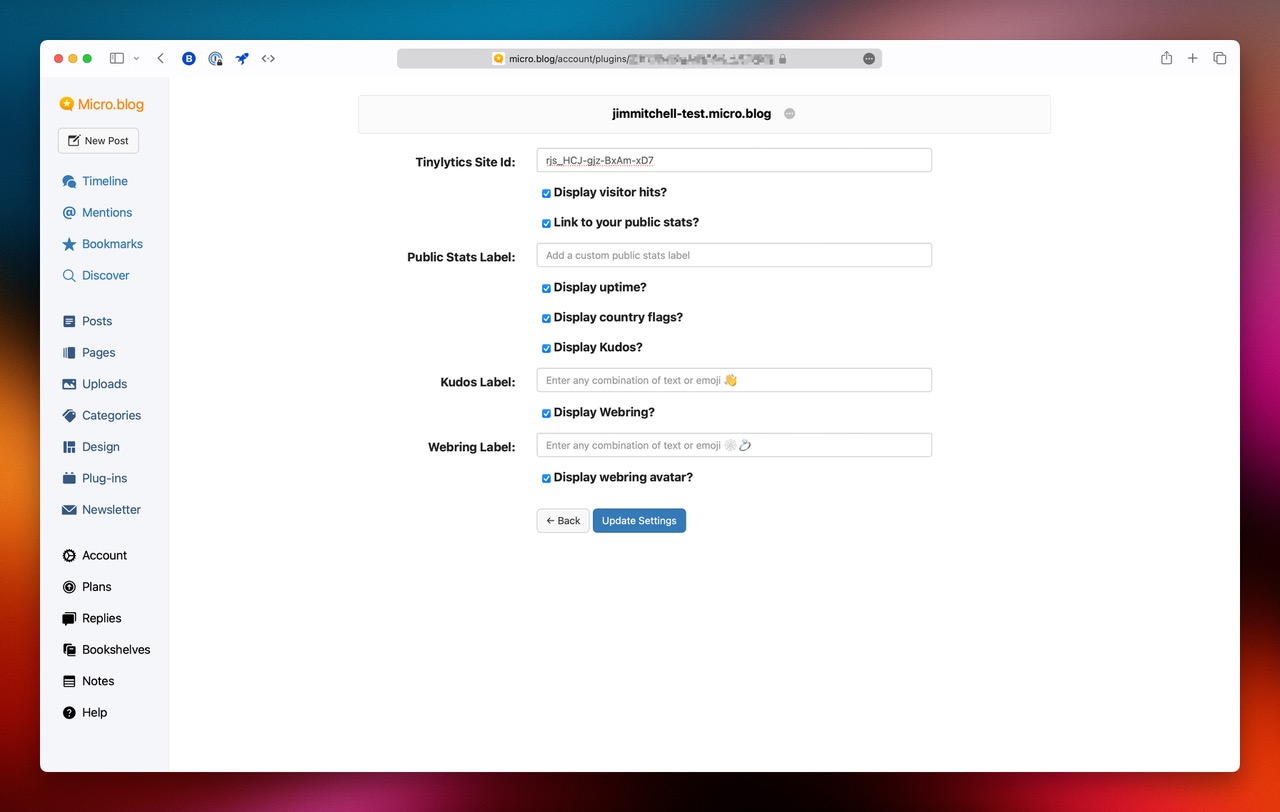
Micro.blog Plugin

Tinylytics for Micro.blog

A simple Micro.blog plug-in to easily add the Tinylytics tracking script to your site.

Tiny Theme for Micro.blog

Tiny Theme for Micro.blog

The most powerful and flexible theme available for Micro.blog, with built-in Tinylytics support.

WordPress Plugin

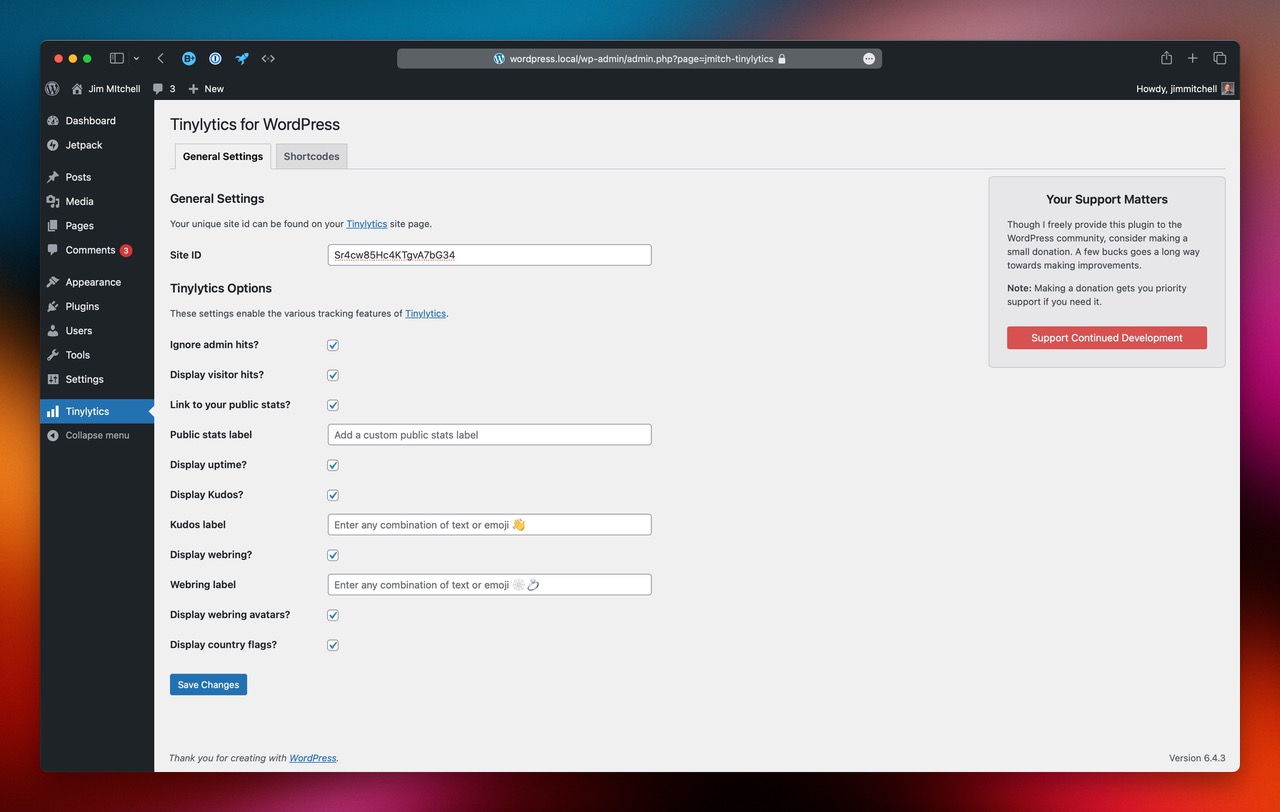
Tinylytics for WordPress

A simple WordPress plug-in to easily add the Tinylytics tracking script to your site.

## Contributing Want to create an integration for Tinylytics? We'd love to feature it here! Get in touch with us: hello@tinylytics.app ### Pixel Tracking for RSS and Email Analytics Source: https://tinylytics.app/docs/pixel_tracking # Pixel Tracking for RSS and Email Analytics
BETA

This feature is currently in beta testing and may be subject to changes.

Pixel tracking allows you to track visitors from sources that don't support JavaScript, such as RSS feeds, email newsletters, and other content distribution platforms. This invisible tracking method provides insights into how your content is consumed across different channels. ## What is Pixel Tracking? Pixel tracking uses a transparent, 1x1 pixel image embedded in your content. When someone views your content (in an RSS reader, email client, etc.), their client fetches this tiny image from our servers, allowing us to record that view anonymously. > **Privacy Note:** Pixel tracking follows the same privacy-friendly principles as our main analytics. No personal data is stored, and visitor information is anonymized using rotating salts. ## Getting Your Pixel Tracking Code 1. Go to your site's Community tab in Tinylytics 2. Your unique pixel tracking URLs and code will be displayed 3. Choose between basic tracking or per-content tracking ## Implementation Methods ### Basic Pixel Tracking For general tracking across all your RSS feeds or emails: ```html ``` ### Per-Content Tracking (Recommended) Track individual posts or content pieces by adding a path parameter: ```html ``` Replace `/your-post-slug` with a unique identifier for each piece of content. ## Platform-Specific Implementation ### RSS Feeds #### Jekyll RSS Template Add to your `feed.xml` template: ```xml {{ post.title | xml_escape }} {{ post.content | xml_escape }} <img src="https://tinylytics.app/pixel/YOUR_SITE_CODE.gif?path={{ post.url | xml_escape }}" alt="" style="width:1px;height:1px;border:0;" /> ``` #### Hugo RSS Template Add to your RSS template (usually `layouts/_default/rss.xml`): ```xml {{ .Title }} {{ .Content | html }} <img src="https://tinylytics.app/pixel/YOUR_SITE_CODE.gif?path={{ .RelPermalink | html }}" alt="" style="width:1px;height:1px;border:0;" /> ``` #### WordPress RSS Add to your theme's `functions.php`: ```php function add_tinylytics_pixel_to_feed($content) { if (is_feed()) { $post_slug = get_post_field('post_name'); $pixel = ''; $content = $content . $pixel; } return $content; } add_filter('the_content_feed', 'add_tinylytics_pixel_to_feed'); ``` #### Ghost RSS Edit your RSS template in the Ghost admin: ```handlebars {{#foreach posts}} {{title}} {{content}} <img src="https://tinylytics.app/pixel/YOUR_SITE_CODE.gif?path={{url}}" alt="" style="width:1px;height:1px;border:0;" /> {{/foreach}} ``` ### Email Newsletters #### HTML Email Template ```html

Your newsletter content...

``` #### Mailchimp Add this to your email template's HTML: ```html ``` #### ConvertKit Add to your email sequence or broadcast: ```html ``` ### Static Site Generators #### 11ty (Eleventy) Add to your post template: ```html {% if permalink %} {% endif %} ``` #### Astro Add to your post layout: ```astro --- const { slug } = Astro.params; --- ``` ## Advanced Tracking Scenarios ### Newsletter Campaign Tracking Track different newsletter campaigns by using descriptive paths: ```html ``` ### Social Media Content Track content shared on platforms that support HTML: ```html ``` ### PDF Documents If you're distributing PDFs that support HTML content: ```html ``` ## Understanding Your Pixel Tracking Data ### What Gets Tracked - **Views**: Each time the pixel image is loaded - **Sources**: RSS readers, email clients, and other platforms - **Geographic data**: Country-level location (anonymized) - **Timing**: When content was viewed - **Content**: Which specific posts or campaigns were viewed ### RSS Reader Detection The system automatically detects and categorizes different RSS readers: - Feedly - Inoreader - NewsBlur - The Old Reader - And many more ### Data in Your Dashboard - View counts per content piece - RSS subscriber estimates - Email open rates (where applicable) - Geographic distribution of pixel hits - Timeline of content consumption ## Troubleshooting ### Pixel Not Loading - Verify your site code is correct - Check that the content platform allows external images - Some email clients block images by default ### Low Tracking Numbers - RSS readers often cache content, reducing pixel loads - Email clients may block images until user action - Some privacy-focused readers/clients block tracking pixels ### Testing Your Implementation 1. Add the pixel to a test RSS feed or email 2. View the content in different readers/clients 3. Check your Tinylytics dashboard for new hits 4. Verify the path parameter is being recorded correctly ## Best Practices ### Path Naming Conventions Use consistent, descriptive paths: - `/rss/post-title-slug` - `/newsletter/2024/01/weekly-update` - `/email/campaign-name` - `/social/platform/post-id` ### Privacy Considerations - Always include empty `alt=""` attributes - Use minimal styling to keep pixels invisible - Inform users about analytics tracking in your privacy policy - Consider offering opt-out mechanisms where appropriate ### Performance Tips - Place pixels at the end of content when possible - Use the `.gif` extension for better compatibility - Keep path parameters simple and URL-encoded ## Limitations - **Email Clients**: Many block images by default - **Privacy Tools**: Some browsers/extensions block tracking pixels - **Cached Content**: RSS readers may cache and not reload pixels - **Offline Reading**: Won't track content read offline ## Getting Help If you're having trouble implementing pixel tracking: 1. Check your Tinylytics dashboard for any error messages 2. Test with a simple HTML file first 3. Verify your site code is active and correct 4. Contact support with specific implementation details Remember: Pixel tracking complements, not replaces, regular JavaScript-based analytics. Use both methods for the most comprehensive view of your content's reach. ### Privacy Policy Source: https://tinylytics.app/docs/privacy # Privacy Policy *Last updated: February 2026* This document outlines the information gathering and data handling practices for Tinylytics and its associated services. ## Information Collection We use [Sentry.io](https://sentry.io) for error monitoring (only your customer ID is logged on application errors) and [Cloudflare](https://cloudflare.com) for platform security and CDN. Server logs are filtered of sensitive data, deleted after 7 days, and do not contain client IPs unless someone attempts to circumvent Cloudflare. Log access is limited to debugging and security; we do not link this data to individual identities. ## Payment Processing For payment processing, Tinylytics uses [Paddle](https://paddle.com/privacy) and [Lemon Squeezy](https://www.lemonsqueezy.com/privacy) (a Stripe company). Please refer to their respective privacy policies for detailed information. We do not store or maintain any credit card information on our servers. ## Security Measures We implement comprehensive security measures to protect against unauthorized access, alteration, or misuse of your information. All data transmission is secured using SSL encryption. Platform security is enhanced through [Cloudflare](https://cloudflare.com), providing protection against malicious activities. ## Third-Party Data Handling We maintain strict data privacy standards. We do not sell your data. We share limited data only when needed for essential operations, including: - debugging and error monitoring, - image delivery, - optional AI insights (described below), and - optional API geolocation fallback lookups. When you send `ip_address` in the hit ingestion API, Tinylytics first resolves country using a local lookup on our own infrastructure. If local resolution fails, Tinylytics may send that IP address to [IPinfo](https://ipinfo.io) to resolve a country code. The raw IP is not stored in Tinylytics hits. When you opt in to AI insights, only aggregated analytics data is shared with our AI providers to generate insights. This data is not used for model training. ## Analytics We use our own analytics solution exclusively on our homepage, demonstrating our commitment to privacy-first analytics. ## AI Insights Optional AI Insights use third-party AI providers (including [xAI](https://x.ai) and [Google Gemini](https://deepmind.google/technologies/gemini/)) to analyze your aggregated analytics data. **This feature is completely opt-in** — it is disabled by default. When enabled, we send only aggregated data (traffic counts, daily patterns, top paths, referrers) to our AI providers. No personally identifiable information about your visitors is shared. We use paid API plans; your data is not used for model training. You can enable or disable this at any time from your account settings. ## Cookie Usage We do not use tracking cookies. We use a single essential session cookie to maintain your login state. This cookie is removed when you log out. ## Uptime Monitoring Uptime monitoring is powered by [updown.io](https://updown.io/r/mbB6q). No personal data is sent to updown.io. We send only the site URL and unique site ID needed for monitoring. ## Contact If you have questions about this privacy policy, please contact us at [hello@tinylytics.app](mailto:hello@tinylytics.app). ### Privacy Compliance (GDPR & CCPA) Source: https://tinylytics.app/docs/privacy_compliance # Privacy Compliance At Tinylytics, we take privacy seriously. Our analytics platform is built from the ground up to be compliant with major privacy regulations, specifically the General Data Protection Regulation (GDPR) and the California Consumer Privacy Act (CCPA). This document outlines how we achieve compliance with these regulations. ## Core Privacy Principles Our approach to privacy is built on these fundamental principles: - Collect only what's necessary - Process transparently - Store securely - Delete promptly - Give users control ## GDPR Compliance We comply with GDPR requirements through the following measures: ### 1. Data Minimization (Art. 5) - Only essential analytics data is collected - User agent strings are stored temporarily and automatically purged after 7 days - IP addresses are never stored in Tinylytics hits - If an API client sends `ip_address` for hit ingestion, Tinylytics first resolves country using a local lookup; only unresolved lookups are sent to IPinfo and then discarded - Geographic data limited to country level only (via Cloudflare) - No personally identifiable information (PII) is retained long-term ### 2. Right to Erasure (Art. 17) - One-click account deletion available - All associated data is immediately deleted upon account cancellation - Automatic deletion of unconfirmed accounts after 7 days - Server logs are filtered for sensitive data and deleted after 7 days ### 3. Transparency (Art. 12-14) - Clear privacy policy explaining all data collection - Detailed technical documentation about data handling - No hidden tracking or data collection methods - All data processing purposes clearly stated - Clear disclosure of third-party services (Cloudflare, Sentry.io, Lemon Squeezy, Paddle, and IPinfo for optional API IP geolocation) ### 4. Data Security (Art. 32) - SSL encryption for all data transmission - Cloudflare as security buffer and CDN provider - Server logs filtered and deleted after 7 days - Regular salt rotation for hash generation - Rate limiting to prevent abuse - Hosted in Europe ### 5. Consent & Right to Object (Art. 7, 21) - Simple mechanism to ignore your own hits via URL parameters - No tracking cookies used (only session cookies for logged-in users) - Clear instructions for opting out in documentation ## CCPA Compliance Our CCPA compliance is built into our core service design. We exceed CCPA requirements by not collecting, selling, or sharing any personal information: ### 1. No Personal Information Sale - We never sell any data to third parties - No data sharing for marketing purposes - No advertising or tracking mechanisms - Limited third-party usage (Cloudflare, Sentry.io, Lemon Squeezy, and Paddle) for essential services only ### 2. Data Rights - Immediate account deletion available - Automated data removal process - Clear documentation of all data handling - Transparent data collection practices - Clear disclosure of all third-party relationships ### 3. Data Collection Transparency - Clear listing of all collected data categories - Explicit purposes for each data type - No collection of personal information beyond essential analytics - All data processing is documented and necessary for service operation - Full disclosure of third-party service providers and their roles ## Technical Implementation Our privacy-first approach is implemented through: 1. **Unique Hit Generation** - Daily reset of unique identifiers - One-way hash generation - No persistent identifiers 2. **Data Storage** - User agent strings automatically purged after 7 days - Server logs deleted after 7 days - Secure, EU-based hosting - Regular data cleanup 3. **Security Measures** - Rate limiting - Request filtering via Cloudflare - Regular security updates ## Third-Party Services We limit third-party service usage to essential operations only: - Cloudflare (Security & CDN) - Lemon Squeezy and Paddle (Payment processing) - Sentry.io (Error tracking, customer ID only) - Local lookup (country resolution on Tinylytics infrastructure) - IPinfo API (fallback country lookup only for unresolved API hit payloads that include `ip_address`) As stated in our privacy policy, we do not sell your data. Third-party services are limited to essential operations and optional features. ## Verification and Updates We regularly review and update our privacy practices to ensure continued compliance. Our commitment to privacy goes beyond mere regulatory compliance – it's a core part of our service offering. For specific implementation details about how we handle analytics data, see our [unique hits documentation](https://tinylytics.app/docs/unique_hits). ## Contact For privacy-related questions or to exercise your rights under GDPR or CCPA, please contact us at hello@tinylytics.app. ### Reports & Notifications Source: https://tinylytics.app/docs/reports_and_notifications # Reports & Notifications Tinylytics keeps you in the loop about your website's performance and health through automated email reports and instant alerts. This guide explains how to configure and manage these communications. ## Email Reports Get a periodic summary of your website's traffic delivered straight to your inbox. This is a great way to keep a pulse on your project without needing to log in to the dashboard constantly. ### What's Inside? The email report includes a snapshot of your site's performance for the reporting period: - **Total Hits**: How many times your site was visited (with unique count if enabled). - **Top Pages**: Your most popular content (up to 30 pages). - **Kudos by Page**: Pages that received kudos during the period (if kudos are enabled). ### Frequency Reports are typically sent on a weekly basis, arriving every Monday. This gives you a fresh start to the week with insights from the previous 7 days. ### Manual Reports Can't wait for Monday? You can trigger a report manually at any time: 1. Navigate to your site's **Edit** tab. 2. Look for the **Email Reports** section. 3. Click **Send Report Now**. ## Uptime Alerts If you have enabled [Uptime Monitoring](https://tinylytics.app/docs/uptime_monitoring_guide), Tinylytics will send you immediate notifications for critical events. ### Types of Alerts - **Downtime**: Received instantly when your site stops responding (confirmed by multiple locations). - **Recovery**: Received when your site comes back online, including the total duration of the downtime. - **SSL Issues**: Warnings about expiring or invalid SSL certificates. ### Testing Alerts To ensure you are receiving emails correctly, you can send test alerts from the dashboard: 1. Go to your site's **Edit** tab and find the **Email Reports** section. 2. Under **Uptime Monitoring Email Preferences**, look for the test buttons. 3. Click **Test Down** or **Test Up** to simulate an event and verify your email setup. ## Content Monitoring Alerts For subscribers using [Content Monitoring](https://tinylytics.app/docs/content_monitoring_guide), Tinylytics sends notifications when issues are detected during a scan. - **Broken Links**: Alerts when internal or external links on your site break. - **Mixed Content**: Alerts when insecure resources are found on secure pages. You can pause these emails if you are performing maintenance on your site to avoid cluttering your inbox. ## Managing Recipients You can control who receives these reports and alerts. By default, the account owner's email is used, but you can add friends, colleagues or stakeholders. 1. Navigate to your site's dashboard. 2. Go to the **Settings** or **Edit** tab. 3. Find the **Email Recipients** section. 4. **Add Recipient**: Enter the email address you want to add. 5. **Remove**: Click the trash icon next to an email to stop sending notifications to that address. *Note: All recipients receive traffic reports. Critical alerts for a specific site currently go only to the account owner.* ### Showing a Hit Counter Source: https://tinylytics.app/docs/show_hit_counter # Showing a Hit Counter With your embed script loaded, you can add a classic-style hit counter to your website and style it as needed. Remember those from the early web days? We're bringing them back, but better! ## Availability This feature is available on all plans. ## Setting Up the Hit Counter It's a simple two-step process: ### 1. Modify Your Embed Script Add the `hits` parameter to your embed script URL: ```html https://tinylytics.app/embed/YOUR_EMBED_CODE.js?hits ``` This loads the additional hit counter functionality. ### 2. Add the Display Element Add this HTML element wherever you want to display the hit count: ```html ``` **Note:** You're not limited to using a `span` - you can use any HTML element. The important part is the `class="tinylytics_hits"` attribute. ### Showing unique hits To show the unique hit count, add the `unique` string to your `hits` parameter in the embed script URL: ```html https://tinylytics.app/embed/YOUR_EMBED_CODE.js?hits=unique ``` Unique hits are available on paid plans. Legacy free accounts ignore this parameter. ## How It Works Once your page loads: 1. The script looks for any element with the `tinylytics_hits` class 2. When found, it replaces the element's content with your site's lifetime hit count 3. The count updates automatically ## Styling You have complete control over the styling. The hit counter inherits your site's styles by default, but you can customize it with CSS to match your design. ## Examples You can see the hit counter in action: - On our homepage (check the footer) - On various sites in our [webring](https://tinylytics.app/docs/showing_webring) ## Tips - You can add multiple hit counters on the same page - The count is updated in real-time - Works great with any CSS framework - Perfect for retro-style websites! ### Showing Visited Countries Source: https://tinylytics.app/docs/showing_countries # Showing Visited Countries Add a global touch to your site by displaying which countries have visited your pages! Tinylytics makes it easy to show this information using emoji flags, arranged in alphabetical order. ## Setting Up Country Display ### 1. Modify Your Embed Script Add the `countries` parameter to your embed script: ```html https://tinylytics.app/embed/YOUR_EMBED_CODE.js?countries ``` ### Combining with Other Features You can combine the countries feature with other Tinylytics features: ```html https://tinylytics.app/embed/YOUR_EMBED_CODE.js?kudos&hits&countries ``` ## Implementation ### Adding the Countries Display Add this HTML element where you want to show the country flags: ```html ``` **Note:** - The element's content will be automatically populated - Countries are displayed as emoji flags - Flags are arranged alphabetically - The display updates automatically as new countries visit ## Example Here's how it looks in action: 🌍 ## Styling Tips - Add padding between flags for better readability - Consider hover effects to show country names - Works well in footers or sidebars - Can be styled to match your site's design ## Best Practices - Place it where it won't distract from main content - Consider adding a title or label - Use appropriate spacing around the flags - Test the display at different screen sizes ## Features - Automatic updates as new countries visit - Emoji flags for visual appeal - Alphabetical ordering for consistency - No maintenance required - just set and forget! ### Adding Kudos to Your Pages Source: https://tinylytics.app/docs/showing_kudos # Adding Kudos to Your Pages Once you've embedded the site script, you can add "kudos" (or "likes") to your pages. It's a great way to get feedback on articles or individual pages without relying on social media - bringing engagement right to your site on the open web. ## Setting Up Kudos ### 1. Modify Your Embed Script Add the `kudos` parameter to your embed script: ```html https://tinylytics.app/embed/YOUR_EMBED_CODE.js?kudos ``` If you're also using the [hit counter](https://tinylytics.app/docs/show_hit_counter), combine them like this: ```html https://tinylytics.app/embed/YOUR_EMBED_CODE.js?hits&kudos ``` ## Implementation Options ### Single Kudos Button For a single kudos button on a page: ```html ``` Leave the button empty - we'll add the content automatically. ### Multiple Kudos Buttons For multiple kudos buttons (e.g., on an index page with multiple posts): ```html ``` **Important:** - The `data-path` attribute ensures correct kudos count for each path - Paths must start with a forward slash (`/`) - Incorrect paths may result in kudos not being recorded properly ## How It Works When your page loads with kudos enabled: 1. The script checks for kudos elements on your page 2. For each button: - Retrieves the current kudos count (e.g., `👋 42`) - Checks if the visitor has already given kudos - Enables/disables the button accordingly 3. When a visitor gives kudos: - Sends the request to our servers - Adds `.did_select` class to the button - Disables the button - Stores a unique kudos ID in localStorage ## Customization Options ### Custom Emoji Change the default 👋 emoji: ```html https://tinylytics.app/embed/YOUR_EMBED_CODE.js?kudos=❤️ ``` ### Custom Styling Use your own image or styling: ```html https://tinylytics.app/embed/YOUR_EMBED_CODE.js?kudos=custom ``` This returns only the count, allowing you to add your own images or styling. ### Private Kudos Keep kudos counts private (visible only to you): ```html ``` **Note:** You'll need to style this to provide visual feedback to users. Check the classes we add (`.did_select`) for styling hooks. ## Plan Features - **Legacy free accounts:** Can use kudos functionality. - **Paid plans:** Access detailed kudos analytics in the dashboard. ## Try It Out ## Tips - Use `.did_select` class for styling active states - Consider adding loading states for better UX - Combine with hit counters for more engagement metrics - Perfect for blogs, portfolios, and documentation sites ### Showing Uptime on Your Site Source: https://tinylytics.app/docs/showing_uptime # Showing Uptime on Your Site Once you've set up uptime monitoring for your site, you can easily display these statistics on your website. It's a great way to showcase your site's reliability! ## Setting Up Uptime Display ### 1. Modify Your Embed Script Add the `uptime` parameter to your embed script: ```html https://tinylytics.app/embed/YOUR_EMBED_CODE.js?uptime ``` ### Combining with Other Features You can combine uptime with other features: ```text With hit counter: https://tinylytics.app/embed/YOUR_EMBED_CODE.js?hits&uptime With hits and kudos: https://tinylytics.app/embed/YOUR_EMBED_CODE.js?hits&kudos&uptime ``` ## Implementation ### Adding the Uptime Display Add this HTML element where you want to show your uptime: ```html ``` **Important Notes:** - Create only one uptime element per page - The script will automatically populate it with your uptime data - Uptime monitoring is available for paid accounts only ## Example Here's how it looks in action: 💯🔥✅ ## Tips - Place the uptime display in your footer or status page - Combine with hit counters for more comprehensive stats - Great for business sites to show reliability - Perfect for SaaS products and professional services ## Plan Features - **Legacy free accounts:** Uptime monitoring is not available. - **Paid plans:** Full uptime monitoring and display capabilities. ### Showing the Webring Source: https://tinylytics.app/docs/showing_webring # Showing the Webring Tinylytics offers a unique webring feature that connects personal websites together. The webring is hand-curated by us and displays random websites from our community. It's a great way to discover and connect with other personal websites! ## Basic Setup ### 1. Modify Your Embed Script Add the `webring` parameter to your embed script: ```html https://tinylytics.app/embed/YOUR_EMBED_CODE.js?webring ``` Combining with other features: ```html https://tinylytics.app/embed/YOUR_EMBED_CODE.js?kudos&hits&webring ``` ### 2. Add the Webring Link Add this HTML element where you want to show the webring: ```html 🕸️💍 ``` **Note:** - Keep the `href` empty - it will be populated automatically - The link content (🕸️💍) can be customized to your liking ## Advanced: Showing Site Avatars ### 1. Enable Avatar Support Modify your embed script to include avatars: ```html https://tinylytics.app/embed/YOUR_EMBED_CODE.js?webring=avatars ``` ### 2. Enhanced Markup Basic avatar implementation: ```html 🕸️💍 ``` Alternative layout (avatar first): ```html 🕸️💍 ``` ## How Avatars Work The avatar system: - Automatically populates `src` and `srcset` attributes - Removes `display: none` when avatar is loaded - Serves images at 100x100px (200x200px for retina) - Includes retina support via `srcset` ## Styling Tips - Avatar images are max 100x100px (200x200px @2x) - Hidden by default to prevent placeholder flashing - Fully customizable with CSS - Consider hover states for better interactivity ## Example Try it out: 🕸️💍 ## Best Practices - Place the webring in your footer or sidebar - Consider adding hover effects for better UX - Use appropriate spacing around the webring - Make it visually consistent with your site's design - Consider adding a title or description near the webring ## Notes - The webring is curated for personal websites - Each click shows a random site from the ring - Avatars are optional but add visual interest - All sites in the ring are manually reviewed ### Terms of Service Source: https://tinylytics.app/docs/terms # Terms of Service ## Introduction Tinylytics ("the Service") is provided by Vincent Ritter Consulting ("the Provider"). The Service operates under Vincent Ritter Consulting until such time as business growth warrants separate incorporation. As a privacy-focused analytics service, we maintain strict data handling practices. Unlike conventional analytics services, we do not monetize your data through third-party sharing or sales. The only data shared with third parties is for essential service operations, such as debugging (limited to user IDs for error tracking) and optional API hit geolocation (country lookup is performed locally first, and IP addresses are sent to IPinfo only as fallback when local lookup cannot resolve, and are not stored in Tinylytics hits). ## Prohibited Activities **NOTICE: Accounts found to contain or facilitate illegal activities will be terminated immediately without prior notice. Vincent Ritter Consulting reserves the right to report such activities to relevant authorities.** ## Service Protection Any attempts to compromise or harm our servers or other customers are strictly prohibited. Account holders are responsible for all activities conducted through their accounts. Violations of these Terms of Service will result in immediate account termination without refund. ## Service Discretion We reserve the right to refuse, suspend, or terminate service at our sole discretion. ## Subscription and Pricing We maintain the right to modify subscription fees at our discretion. Customers will receive at least 30 days' notice via email of any pricing changes, providing the opportunity to terminate their subscription before changes take effect. Continued use of the Service after price changes constitutes acceptance of the modified fees. ## Refund Policy We offer a 30-day, no-questions-asked refund policy on initial payments. ## Fair Usage Policy All paid plans are provided on an unlimited basis with no hard limits on hits or pageviews. To ensure continued high performance and fairness for every user, we monitor overall platform load. Accounts that consistently exceed 1,000,000 hits per month (averaged over any 3-month period) may be reviewed. In such cases we will contact the account owner directly to discuss usage and explore suitable options (such as moving to a higher-tier plan). No automatic restrictions or extra charges will ever be applied without prior personal communication. We reserve the right to suspend or terminate any account that uses the service in a way that materially harms our infrastructure or other users. ## Account Management We reserve the right to mark accounts as inactive and schedule them for deletion as specified in our notification emails and website documentation. Account status changes are always communicated in advance, and accounts can be reactivated prior to the scheduled deletion date. **Important: Unconfirmed accounts are automatically deleted after 7 days** due to email verification requirements. ## Legacy Free Account Locking Policy To ensure fair usage for all users, we maintain an account locking system for legacy free accounts that consistently exceed usage limits. ### Automatic Account Locking Legacy free accounts that exceed our usage threshold (currently 1,000 hits per month, averaged over a 3-month period) will: 1. First receive several email notifications recommending an upgrade 2. If usage continues to exceed limits without upgrading, the account will be automatically locked ### Manual Account Locking We reserve the right to manually lock any account at our discretion if we determine that: 1. The account usage significantly exceeds legacy free tier limits 2. The account is being used in a way that negatively impacts our service or other users 3. The account violates any part of our Terms of Service ### Effects of Account Locking When an account is locked: 1. **Data Collection Continues**: Analytics data will continue to be collected without interruption or data loss 2. **Limited Dashboard Access**: Access to the dashboard will be restricted to the upgrade reminder page 3. **Email Reports Paused**: Weekly email reports will be temporarily suspended 4. **Immediate Restoration**: Upgrading to a paid plan will immediately unlock all features and restore full access We will provide clear notification via email when an account is locked, including instructions on how to restore full access. ## Warranty Disclaimer THE INFORMATION, SOFTWARE, PRODUCTS, SERVICES, AND CONTENT AVAILABLE IN tinylytics.app ARE PROVIDED TO YOU "AS IS" AND WITHOUT WARRANTY. VINCENT RITTER CONSULTING AND ITS SUBSIDIARIES, AFFILIATES, OFFICERS, EMPLOYEES, AGENTS, PARTNERS, AND LICENSORS HEREBY DISCLAIM ALL WARRANTIES WITH REGARD TO SUCH INFORMATION, SOFTWARE, PRODUCTS, SERVICES AND CONTENT, INCLUDING, WITHOUT LIMITATION, ALL IMPLIED WARRANTIES AND CONDITIONS OF MERCHANTABILITY, FITNESS FOR A PARTICULAR PURPOSE, TITLE AND NONINFRINGEMENT. VINCENT RITTER CONSULTING AND ITS SUBSIDIARIES, AFFILIATES, OFFICERS, EMPLOYEES, AGENTS, PARTNERS, AND LICENSORS MAKE NO WARRANTY THAT: a) THE SERVICE WILL MEET YOUR REQUIREMENTS; b) THE SERVICE WILL BE UNINTERRUPTED, TIMELY, SECURE, OR ERROR-FREE; c) THE RESULTS THAT MAY BE OBTAINED FROM THE USE OF THE SERVICE WILL BE ACCURATE OR RELIABLE; d) THE QUALITY OF ANY PRODUCTS, SERVICES, INFORMATION, OR OTHER MATERIAL PURCHASED OR OBTAINED BY YOU THROUGH THE SERVICE WILL MEET YOUR EXPECTATIONS; AND e) ANY ERRORS IN tinylytics.app WILL BE CORRECTED. ## Limitation of Liability YOU EXPRESSLY AGREE TO RELEASE VINCENT RITTER CONSULTING, ITS SUBSIDIARIES, AFFILIATES, OFFICERS, AGENTS, REPRESENTATIVES, EMPLOYEES, PARTNERS AND LICENSORS (THE "RELEASED PARTIES") FROM ANY AND ALL LIABILITY CONNECTED WITH YOUR ACTIVITIES, AND PROMISE NOT TO SUE THE RELEASED PARTIES FOR ANY CLAIMS, ACTIONS, INJURIES, DAMAGES, OR LOSSES ASSOCIATED WITH YOUR ACTIVITIES. YOU ALSO AGREE THAT IN NO EVENT SHALL THE RELEASED PARTIES BE LIABLE TO YOU OR ANY THIRD PARTY FOR ANY DIRECT, INDIRECT, PUNITIVE, INCIDENTAL, SPECIAL OR CONSEQUENTIAL DAMAGES ARISING OUT OF OR IN ANY WAY CONNECTED WITH: a) YOUR USE OR MISUSE OF tinylytics.app, b) YOUR DEALINGS WITH THIRD PARTY SERVICE PROVIDERS OR ADVERTISERS AVAILABLE THROUGH tinylytics.app, c) ANY DELAY OR INABILITY TO USE tinylytics.app EXPERIENCED BY YOU, d) ANY INFORMATION, SOFTWARE, PRODUCTS, SERVICES, OR CONTENT OBTAINED THROUGH tinylytics.app, WHETHER BASED ON CONTRACT, TORT, STRICT LIABILITY, OR OTHERWISE, EVEN IF VINCENT RITTER CONSULTING HAS BEEN ADVISED OF THE POSSIBILITY OF DAMAGES. BECAUSE SOME STATES/JURISDICTIONS DO NOT ALLOW THE EXCLUSION OR LIMITATION OF LIABILITY FOR CONSEQUENTIAL OR INCIDENTAL DAMAGES, THE ABOVE LIMITATION MAY NOT APPLY TO YOU. ## Indemnification Users agree to indemnify and hold harmless Vincent Ritter Consulting, its affiliates, officers, employees, and partners from any claims arising from Service usage, Terms violations, or rights infringement. ## Service Availability Service availability varies by region and may change without notice. We reserve the right to modify service availability at our discretion. ## Terms Acceptance By activating an account, users acknowledge and accept these terms and policies. Account activation records include acceptance of these terms. Vincent Ritter Consulting reserves the right to modify these terms and policies without notice. We also maintain the right to adjust pricing and service plans at our discretion. ### Understanding Unique Hit Tracking Source: https://tinylytics.app/docs/unique_hits # Understanding Unique Hit Tracking ## What are Unique Hits? Unique hits represent distinct visits to your website pages. While total hits count every page view (including refreshes and repeat visits), unique hits provide a more accurate picture of individual visitor sessions on a per-page basis. ## How We Track Unique Hits Our unique hit tracking system is built with privacy at its core, using advanced anonymisation techniques: ### Data Collection - **Page Information:** - Current URL path - Page title - Referrer (when available) - **Browser Data:** - User agent string (truncated for privacy) - **Request Data:** - Cloudflare-provided information - Timestamp - Geographic region (country only) ### Privacy-First Processing 1. **Anonymisation:** All potentially identifying information is stripped or truncated before processing 2. **Hash Generation:** We combine the collected data with: - Current date - Rotating salt (changes every 12 hours) - Site identifier and page path - Anonymised request data 3. **One-Way Encryption:** The final hash is irreversible, ensuring visitor privacy ## Privacy and Security Measures - Zero personal data storage - IP addresses from Cloudflare edge locations are used only for hash generation (which are not the same as your visitor's IP address) - Regular salt rotation (every 12 hours) - Cloudflare as a privacy buffer - GDPR and CCPA compliant approach ([learn more about our compliance](https://tinylytics.app/docs/privacy_compliance)) - No cookies or local storage used - Rate limiting to prevent abuse ## What This Means for Site Owners - **Accurate Analytics:** Get meaningful visitor insights without compromising privacy - **Time-Based Stats:** View unique visitors within a 24-hour window - **Geographic Insights:** Country-level analytics without personal tracking - **Zero Setup:** Privacy protection works out of the box ## Technical Considerations - Unique hits reset daily at midnight UTC - Geographic data is approximate (country-level only) - Bot traffic and other automated requests are automatically filtered - Cached responses don't trigger new hits - Rate limiting of 25 hits per minute per source, and other limits to prevent abuse - User agent strings are truncated to 50 characters For implementation details and get started, see our [script embedding guide](https://tinylytics.app/docs/embedding_your_script). ### Guide to Uptime Monitoring Source: https://tinylytics.app/docs/uptime_monitoring_guide # Guide to Uptime Monitoring ## What is Uptime Monitoring? Uptime monitoring is a service that regularly checks if your website is online and functioning properly. Tinylytics uptime monitoring provides: - Regular health checks of your website - Immediate notifications when your site goes down or comes back up - SSL certificate monitoring and expiration alerts - Historical uptime statistics and event tracking - Easy display of uptime stats on your website Uptime monitoring is powered by the awesome folks at [updown.io](https://updown.io/r/mbB6q), a proven uptime monitoring service that we've used for many years (which actually powers our own [status page](https://status.tinylytics.app) too). ## How It Works ### Monitoring Process 1. **Regular Checks**: Tinylytics checks your website every 5-10 minutes when it's functioning normally. 2. **Multiple Verification**: When a potential downtime is detected, the system: - Marks it as potential downtime behind the scenes - Performs multiple verification checks across different regions - Only sends notifications once downtime is confirmed 3. **Adaptive Monitoring**: Check frequency automatically adjusts based on site status: - When your site is up: Checks every 5-10 minutes - When your site just went down: Checks every 5 minutes - After 24 hours of downtime: Reduces to every 10 minutes - After 48 hours of downtime: Reduces to every 30 minutes - After 3 days of downtime: Reduces to every 1 hour - After 7 days of downtime: Auto-pauses monitoring (can be resumed anytime) ### SSL Certificate Monitoring For HTTPS sites, Tinylytics also monitors your SSL certificate: - Validates certificate authenticity - Tracks expiration dates - Sends notifications 30, 14, 7 & 1 day before expiration - Provides detailed SSL status in your dashboard - Detects and reports specific SSL issues: - SNI (Server Name Indication) problems - Certificate chain issues - Protocol compatibility problems - Configuration errors ## Notifications Tinylytics sends email notifications for important events: - **Downtime Alerts**: - Initial detection with verification status - Confirmed downtime with detailed error information - Accurate timing of when the issue started - **Recovery Notices**: - Precise downtime duration - Time of recovery - Previous error state for context - **SSL Warnings**: - Certificate expiration warnings (30 days notice) - Configuration issues with specific details - Renewal confirmations - **Auto-Pause Notifications**: When monitoring is paused after extended downtime of more than 7 days The system includes detailed error information to help diagnose problems: - HTTP error codes with user-friendly explanations: - Authentication issues (401, 403) - Missing content (404) - Server errors (500, 502, 503, 504) - Rate limiting (429) - Connection issues: - Timeout/expired connections - Connection refused errors - DNS resolution problems - Network routing issues - SSL/TLS errors ## Dashboard Features Monitor your website's status through the Tinylytics dashboard: - **Uptime Percentage**: View your site's reliability over time - **Current Status**: See if your site is currently up or down - **Event History**: Track all downtime events - **SSL Certificate Status**: Monitor certificate validity and expiration - **Manual Controls**: Pause and resume monitoring, great for when you're working on a site during maintenance ## Displaying Uptime on Your Site Once you've set up uptime monitoring, you can display your uptime stats on your website: ### 1. Modify Your Embed Script Add the `uptime` parameter to your embed script: ```html https://tinylytics.app/embed/YOUR_EMBED_CODE.js?uptime ``` ### 2. Add the Uptime Element Add this HTML element where you want to show your uptime: ```html ``` ### Combining with Other Features You can combine uptime with other Tinylytics features: ```text With hit counter: https://tinylytics.app/embed/YOUR_EMBED_CODE.js?hits&uptime With hits and kudos: https://tinylytics.app/embed/YOUR_EMBED_CODE.js?hits&kudos&uptime ``` ## Troubleshooting Common Issues ### Site Shows as Down But It's Working Possible causes: - Bot protection or firewall blocking monitoring requests - Rate limiting from security tools - Regional networking issues Solutions: - Whitelist the Tinylytics User Agent in your firewall settings - Configure Cloudflare to allow Tinylytics monitoring requests - Verify bot protection settings - Contact support if issues persist ### Firewall and CDN Configuration Tinylytics uses a specific User Agent for uptime checks: ```text Tinylytics Uptime Monitor/1.0 ``` You may also encounter the following User Agent if your monitor was set up before April 1st, 2025: ```text updown.io daemon 2.11 ``` If you're using Cloudflare or similar services, you should create a rule to allow requests with this User Agent. Otherwise, your firewall might block our health checks, resulting in false downtime alerts. #### For Cloudflare users: 1. Go to your Cloudflare dashboard 2. Navigate to Security → WAF → Create Rule 3. Create a rule that allows traffic when the User Agent contains "Tinylytics Uptime Monitor" and/or "updown.io daemon" 4. Set the rule to "Skip" security features for matching requests ### IP addresses for Monitoring These are the addresses used by monitoring, in case you need to whitelist these. IPv4: - 45.32.107.181 - 45.32.74.41 - 91.121.222.175 - 104.238.159.87 - 178.63.21.176 - 135.181.102.135 - 45.76.104.117 - 104.238.136.194 - 45.63.29.207 - 192.99.37.47 IPv6: - 2001:19f0:6c01:145::1 - 2607:5300:60:4c2f::1 - 2001:19f0:6001:2c6::1 - 2001:19f0:7001:45a::1 - 2001:19f0:4400:402e::1 - 2a01:4f8:141:441a::2 - 2a01:4f9:c010:d5f9::1 - 2001:41d0:2:85af::1 - 2001:19f0:9002:11a::1 - 2001:19f0:5801:1d8::1 ### SSL Certificate Warnings Common issues: - Certificate approaching expiration - Self-signed certificates - Incomplete certificate chains - SNI (Server Name Indication) configuration problems Solutions: - Renew certificates before they expire - Use trusted certificate authorities - Configure proper certificate chains - Set up SNI correctly for shared hosting ## Plan Features and Limitations - **Legacy free accounts:** Uptime monitoring is not available. - **Paid plans:** Full uptime monitoring and SSL certificate monitoring. ## Best Practices - Place the uptime display in your footer or status page - Combine with hit counters for more comprehensive stats - Resume monitoring promptly after auto-pause - Keep your SSL certificates up to date - Use the monitoring data to improve your hosting setup --- By following this guide, you'll be able to fully utilize Tinylytics' uptime monitoring to ensure your website stays reliable and secure. ### Webhooks Documentation Source: https://tinylytics.app/docs/webhooks # Tinylytics Webhooks Webhooks let Tinylytics send a JSON `POST` to your application when selected events happen. Use them to pipe downtime alerts, live hits, and kudos into your own systems without polling the API. Webhooks are available to Plus users. Tinylytics only creates outbound webhook events when the site owner is Plus, the webhook is active, the event type is selected, and the underlying write is accepted. ## 1. Quick Start 1. Open **Account Settings**. 2. Choose **Webhooks**. 3. Create a webhook with a public HTTP or HTTPS URL. HTTPS is recommended. 4. Select the events you want to receive. 5. Save the webhook and copy the signing secret. 6. Use **Send Test** from the webhook edit screen to confirm your endpoint and signature verification. Your endpoint should return a `2xx` response as soon as it accepts the delivery. Do any slower processing in a background job on your side. Treat webhook delivery as at-least-once. Store `X-Tinylytics-Delivery`, or the nested `hit.id` or `kudo.uid`, if duplicate processing would be a problem. ## 2. Delivery Contract Tinylytics sends each delivery as an HTTP `POST` with a JSON body. | Property | Value | | --- | --- | | Method | `POST` | | Content type | `application/json` | | Timeout | 30 seconds | | Open timeout | 10 seconds | | Success response | Any `2xx` status | | Failed response | Network errors, unsafe URLs, timeouts, `3xx`, `4xx`, or `5xx` responses | | Retry limit | Up to 10 failed attempts | Each delivery includes these headers: | Header | Description | | --- | --- | | `Content-Type` | Always `application/json`. | | `X-Tinylytics-Event` | Event type, such as `new_hit` or `monitor_down`. | | `X-Tinylytics-Delivery` | Unique delivery id. This is the `WebhookEvent` id and can be used for idempotency. | | `X-Tinylytics-Timestamp` | Unix timestamp for the delivery attempt. | | `X-Signature` | HMAC SHA-256 signature in the format `sha256=`. | Retries use this schedule after failed attempts: 30 seconds, 1 minute, 5 minutes, 15 minutes, 30 minutes, 1 hour, 2 hours, 4 hours, 8 hours, and 12 hours. Tinylytics stores recent deliveries under the webhook's **Events** page. You can inspect the payload, response code, response body, error message, attempt count, and retry status there. Failed events can be retried manually from that page. ## 3. Event Directory | Event | When it fires | Payload key | | --- | --- | --- | | `monitor_down` | An uptime monitor reports the site as down. | `monitor`, `downtime` | | `monitor_up` | An uptime monitor reports the site as recovered. | `monitor`, `downtime` | | `new_hit` | Tinylytics accepts a live hit from the collector script, tracking pixel, API create endpoint, or API batch create endpoint. Batch creates emit one webhook event per accepted hit. | `hit` | | `new_kudo` | Tinylytics accepts a browser kudo, API kudo, or verified Webmention like. | `kudo` | Existing monitor-only webhooks do not receive `new_hit` or `new_kudo` until you edit them and select the new event types. Tinylytics does not emit hit or kudo webhooks for ignored paths, ignored visitors, spam-suppressed writes, rate-limited writes, imports, seeds, cron-generated data, reimports, manual model creates, or kudo deletes. ## 4. Payload Reference Every event uses the same top-level wrapper. | Field | Type | Description | | --- | --- | --- | | `event` | string | The event type. Matches `X-Tinylytics-Event`. | | `timestamp` | string | ISO 8601 timestamp for when Tinylytics created the webhook payload. | | `site` | object | Site metadata. | The `site` object has this shape: | Field | Type | Description | | --- | --- | --- | | `id` | integer | Tinylytics site id. | | `name` | string | Display name for the site. | | `url` | string | Site URL. | | `dashboard_url` | string | Tinylytics dashboard URL for the site. | ### `monitor_down` ```json { "event": "monitor_down", "timestamp": "2026-05-14T12:00:00Z", "site": { "id": 123, "name": "Example Blog", "url": "https://example.com", "dashboard_url": "https://tinylytics.app/sites/123" }, "monitor": { "id": 456, "status": "down" }, "downtime": { "started_at": "2026-05-14T11:58:00Z", "started_at_formatted": "May 14, 2026 at 11:58", "ended_at": null, "ended_at_formatted": null, "duration_seconds": 120, "duration_formatted": "2 minutes", "error": "Connection timeout" } } ``` ### `monitor_up` ```json { "event": "monitor_up", "timestamp": "2026-05-14T12:08:00Z", "site": { "id": 123, "name": "Example Blog", "url": "https://example.com", "dashboard_url": "https://tinylytics.app/sites/123" }, "monitor": { "id": 456, "status": "up" }, "downtime": { "started_at": "2026-05-14T11:58:00Z", "started_at_formatted": "May 14, 2026 at 11:58", "ended_at": "2026-05-14T12:08:00Z", "ended_at_formatted": "May 14, 2026 at 12:08", "duration_seconds": 600, "duration_formatted": "10 minutes", "error": "Connection timeout" } } ``` ### `new_hit` The `hit` object matches the existing create-hit API response shape. ```json { "event": "new_hit", "timestamp": "2026-05-14T12:15:00Z", "site": { "id": 123, "name": "Example Blog", "url": "https://example.com", "dashboard_url": "https://tinylytics.app/sites/123" }, "hit": { "id": 789, "url": "https://example.com/articles/webhooks", "path": "/articles/webhooks", "referrer": "https://example.org", "country": "US", "browser_name": "Safari", "platform_name": "macOS", "is_mobile": false, "source": "newsletter", "unique_hash": "4cc1ed6d2f0d", "visitor_hash": "9e89d84f3e47", "created_at": "2026-05-14T12:15:00.000Z" } } ``` `referrer`, `country`, `browser_name`, `platform_name`, `source`, `unique_hash`, and `visitor_hash` can be `null` depending on the request and privacy rules. ### `new_kudo` The `kudo` object matches the existing API kudo response shape. ```json { "event": "new_kudo", "timestamp": "2026-05-14T12:20:00Z", "site": { "id": 123, "name": "Example Blog", "url": "https://example.com", "dashboard_url": "https://tinylytics.app/sites/123" }, "kudo": { "id": 987, "uid": "kudo_d4f96c", "path": "/articles/webhooks", "created_at": "2026-05-14T12:20:00.000Z" } } ``` Test deliveries from the webhook edit screen include a top-level `"test": true` flag and sample data. They use the same delivery job, headers, signature format, and retry behaviour as live deliveries. ## 5. Signature Verification Tinylytics signs the exact JSON request body with the webhook signing secret: ```text X-Signature: sha256= ``` Verify the signature before parsing or trusting the JSON. Always compute the HMAC from the raw request body you received. If you enable the content wrapper or use Discord formatting, the signed body is the transformed body that Tinylytics sent. ### Rails Example ```ruby class TinylyticsWebhooksController < ApplicationController skip_before_action :verify_authenticity_token def create return head :unauthorized unless valid_signature? payload = JSON.parse(request.raw_post) case request.headers["X-Tinylytics-Event"] when "monitor_down" # Notify your incident system. when "monitor_up" # Resolve your incident. when "new_hit" # Enqueue analytics processing. when "new_kudo" # Notify the author or update local counters. end head :ok end private def valid_signature? signature = request.headers["X-Signature"].to_s body = request.raw_post expected = "sha256=#{OpenSSL::HMAC.hexdigest("sha256", signing_secret, body)}" signature.bytesize == expected.bytesize && ActiveSupport::SecurityUtils.secure_compare(signature, expected) end def signing_secret Rails.application.credentials.dig(:tinylytics, :webhook_signing_secret) end end ``` ### Node.js Example Mount this route before any JSON middleware that would consume the raw body. ```js import crypto from "node:crypto"; import express from "express"; const app = express(); app.post("/webhooks/tinylytics", express.raw({ type: "application/json" }), (req, res) => { const secret = process.env.TINYLYTICS_WEBHOOK_SIGNING_SECRET; const signature = req.get("X-Signature") || ""; const expected = `sha256=${crypto.createHmac("sha256", secret).update(req.body).digest("hex")}`; const verified = signature.length === expected.length && crypto.timingSafeEqual(Buffer.from(signature), Buffer.from(expected)); if (!verified) { return res.sendStatus(401); } const eventType = req.get("X-Tinylytics-Event"); const payload = JSON.parse(req.body.toString("utf8")); switch (eventType) { case "new_hit": // Enqueue analytics processing. break; case "new_kudo": // Notify the author or update local counters. break; case "monitor_down": case "monitor_up": // Route monitor alerts. break; } res.sendStatus(200); }); ``` ## 6. Platform And Body Options The default platform is **Generic**. It receives the JSON payloads shown above. If **Wrap content** is enabled, Tinylytics wraps the event payload before delivery: ```json { "content": { "event": "new_hit", "timestamp": "2026-05-14T12:15:00Z", "site": {}, "hit": {} } } ``` Discord webhooks use custom embeds for `monitor_down` and `monitor_up`. Other event types, including `new_hit` and `new_kudo`, use the generic Discord fallback unless Tinylytics adds a custom Discord format later. ## 7. Common Flows ### Downtime Alerts Select `monitor_down` and `monitor_up`. Verify the signature, route `monitor_down` to your alerting or incident tool, and mark the incident resolved when `monitor_up` arrives. ### Live Hit Processing Select `new_hit`. Tinylytics creates one webhook event after each accepted live hit from the collector script, tracking pixel, API create endpoint, or API batch endpoint. Use `X-Tinylytics-Delivery` for delivery idempotency and `hit.id` for hit idempotency. ### Kudos Notifications Select `new_kudo`. Tinylytics creates one webhook event after each accepted browser kudo, API kudo, or verified Webmention like. Use `kudo.uid` if you need a stable public identifier. ### API Writes And Webhooks Successful API hit and kudo creates can emit webhook events. Ignored or rejected writes do not emit webhooks, even if the API request returns a handled response. ## 8. Troubleshooting | Problem | What to check | | --- | --- | | No deliveries appear | Confirm the site owner is Plus, the webhook is active, and the event type is selected. | | Test works but live hits do not | Confirm the hit is not ignored, spam-suppressed, imported, seeded, or manually created. | | Signature mismatch | Verify against the raw request body, not a parsed and re-serialized JSON object. | | Repeated retries | Return a `2xx` status after accepting the event. Redirects, `4xx`, and `5xx` responses are treated as failures. | | Endpoint rejected | Use a public HTTP or HTTPS endpoint. Localhost, private network addresses, and unsafe URLs are blocked. | | Discord output is generic | `new_hit` and `new_kudo` currently use the generic Discord fallback. | ### Webmention Support Source: https://tinylytics.app/docs/webmentions # Webmention Support
BETA

This feature is currently in beta testing and may be subject to changes.

Tinylytics supports collecting "likes" from across the web using Webmentions. This allows you to integrate appreciation from the IndieWeb directly into your dashboard. When someone likes your post on their own site or via services like [Bridgy](https://bridgy.fed.wiki/Like), it is automatically verified and converted into a Kudo in your statistics. ## How it Works 1. **Detection**: You add a special `` tag to your website's ``. 2. **Delivery**: When someone likes your post, a Webmention is sent to your unique Tinylytics endpoint. 3. **Verification**: Our servers verify that the source page actually contains a link to your target page and that it's a legitimate "like" or "mention". 4. **Integration**: Verified mentions appear in your **Community** tab. If the mention is a "like", it's also automatically counted as a **Kudo** for that specific path. ## Implementation To enable Webmention support, add the following tag to your site's ``: ```html ``` > [!TIP] > You can find your unique link tag in both the **Kudos** setup section and the **Community** tab instructions on your dashboard. ## Features Once implemented, verified mentions provide several benefits: - **External Kudos**: Verified "likes" are automatically recorded as a Kudo for the target path. - **Source Information**: In the Kudos path statistics, you can filter for "External" sources to see which websites are sending you appreciation. - **Community Feed**: The **Community** tab shows a feed of recent verified mentions, including the source URL, title, and a snippet of content if available. ## Supported Mention Types Currently, Tinylytics processes the following types of Webmentions: - **Likes**: Registered as Kudos. - **Mentions/Reposts**: Verified and displayed in your Community feed. We are actively refining the verification process and how mentions are displayed. ### Why we no longer offer a free plan Source: https://tinylytics.app/docs/why_free_plan # We no longer offer a free plan Thanks for your interest in Tinylytics. We offered a free plan early on while building the product. We now focus on paid plans so we can continue improving reliability, support, and new features. Some legacy free accounts may still exist and are handled under our current account policies.